Anti-bot measures are widespread, appearing on major websites and even some cyber-crime platforms to prevent spam or abuse. One advanced anti-bot system is Netacea, though it’s less commonly used on cyber-crime sites from my observations. For more sophisticated websites, you may need to programmatically control a desktop web browser rather than a headless browser like Playwright. One approach to explore is Hidden VNC for browser automation, which allows you to simulate mouse and keyboard interactions.
Since websites cannot access your system directly, they can still detect headless browsers or browser extensions. However, automating interactions through your operating system can often go undetected, as it mimics genuine user behavior more effectively. While this technique is beyond the scope of this course, it’s an option you may investigate independently. Most cyber-crime sites implement rate-limiting based on IP addresses and CAPTCHAs to block bots.
The topics of this section include the following:
- Rate limiting
- IP bans
- Captcha bypass
- Account lockouts
Rate limiting
Most websites have rate-limiting enabled for certain endpoints, the goal of rate-liming is to prevent excessive requests sent to a web page. From a developer's perspective, here is how rate-limiting is setup for a route:
limiter = Limiter(
	get_remote_address,
	app=app,
	default_limits=["500 per day", "200 per hour"],
	storage_uri="memory://"
)

@app.route('/post/<post_type>/<int:post_id>')
@limiter.limit("30 per minute")
@login_required
def post_detail(post_type, post_id):
For reference, I am running
tornet_forumlocally without tor.
Default limits is 500 requests from one IP to every other route every day and 200 requests per hour. But for /api/post, the limit is 30 requests per minute, so after 30 requests you won't be able to send further requests. That route is used for showing details of a post, here is what the URL looks like:
http://127.0.0.1:5000/post/announcements/272
Here is a python example to show what exceeding the limit does:
import requests

url = "http://127.0.0.1:5000/post/announcements/272"
cookies = {
    "session": ".eJwlzjkOwjAQAMC_uKbwru098hmUvQRtQirE30FiXjDvdq8jz0fbXseVt3Z_RtsaLq_dS6iPEovRuyIyhhGoxMppFG5CJEAEy3cuZ9LivWN0nWwyLCZS6tI5h66oWdA9hBADWN14xyrJ6LkmFFj5yjKsMVjbL3Kdefw30D5fvlgvjw.aHE7pQ.HyexRW6P3g7njbSz53vZj77gmMU"
}

for reqnum in range(31):
    response = requests.get(url, cookies=cookies)
    print(f"Request number: {reqnum} | HTTP Status code: {response.status_code}")
Output:
-> % python3 rate_limit_test.py
Request number: 0 | HTTP Status code: 200
Request number: 1 | HTTP Status code: 200
Request number: 2 | HTTP Status code: 200
Request number: 3 | HTTP Status code: 200
Request number: 4 | HTTP Status code: 200
Request number: 5 | HTTP Status code: 200
Request number: 6 | HTTP Status code: 200
Request number: 7 | HTTP Status code: 200
Request number: 8 | HTTP Status code: 200
Request number: 9 | HTTP Status code: 200
Request number: 10 | HTTP Status code: 200
Request number: 11 | HTTP Status code: 200
Request number: 12 | HTTP Status code: 200
Request number: 13 | HTTP Status code: 200
Request number: 14 | HTTP Status code: 200
Request number: 15 | HTTP Status code: 200
Request number: 16 | HTTP Status code: 200
Request number: 17 | HTTP Status code: 200
Request number: 18 | HTTP Status code: 200
Request number: 19 | HTTP Status code: 200
Request number: 20 | HTTP Status code: 200
Request number: 21 | HTTP Status code: 200
Request number: 22 | HTTP Status code: 200
Request number: 23 | HTTP Status code: 200
Request number: 24 | HTTP Status code: 200
Request number: 25 | HTTP Status code: 200
Request number: 26 | HTTP Status code: 200
Request number: 27 | HTTP Status code: 200
Request number: 28 | HTTP Status code: 200
Request number: 29 | HTTP Status code: 200
Request number: 30 | HTTP Status code: 429
In real-world scenarios, you typically cannot access an application's source code, so determining the rate limit such as the number of requests allowed per minute or 10 minutes requires trial and error. While scripts can automate this process, it remains tedious.
Now that we know the rate limit is triggered after 30 requests, we can send 29 requests, pause for 60 seconds, send another 29 requests, and repeat this cycle:
import requests
import time

REQUEST_COUNT = 29
SLEEP_DURATION = 60

url = "http://127.0.0.1:5000/post/announcements/272"
cookies = {
    "session": ".eJwlzjkOwjAQAMC_uKbwru098hmUvQRtQirE30FiXjDvdq8jz0fbXseVt3Z_RtsaLq_dS6iPEovRuyIyhhGoxMppFG5CJEAEy3cuZ9LivWN0nWwyLCZS6tI5h66oWdA9hBADWN14xyrJ6LkmFFj5yjKsMVjbL3Kdefw30D5fvlgvjw.aHE7pQ.HyexRW6P3g7njbSz53vZj77gmMU"
}

batch_num = 1
while True:
    print(f"Starting batch {batch_num}")
    for reqnum in range(REQUEST_COUNT):
        response = requests.get(url, cookies=cookies)
        print(f"Batch {batch_num} | Request number: {reqnum + 1} | HTTP Status code: {response.status_code}")

    print(f"Batch {batch_num} completed. Sleeping for {SLEEP_DURATION} seconds...")
    time.sleep(SLEEP_DURATION)
    batch_num += 1
Output:
-> % python3 rate_limit_test.py
Starting batch 1
Batch 1 | Request number: 1 | HTTP Status code: 200
Batch 1 | Request number: 2 | HTTP Status code: 200
Batch 1 | Request number: 3 | HTTP Status code: 200
Batch 1 | Request number: 4 | HTTP Status code: 200
Batch 1 | Request number: 5 | HTTP Status code: 200
Batch 1 | Request number: 6 | HTTP Status code: 200
Batch 1 | Request number: 7 | HTTP Status code: 200
Batch 1 | Request number: 8 | HTTP Status code: 200
Batch 1 | Request number: 9 | HTTP Status code: 200
Batch 1 | Request number: 10 | HTTP Status code: 200
Batch 1 | Request number: 11 | HTTP Status code: 200
Batch 1 | Request number: 12 | HTTP Status code: 200
Batch 1 | Request number: 13 | HTTP Status code: 200
Batch 1 | Request number: 14 | HTTP Status code: 200
Batch 1 | Request number: 15 | HTTP Status code: 200
Batch 1 | Request number: 16 | HTTP Status code: 200
Batch 1 | Request number: 17 | HTTP Status code: 200
Batch 1 | Request number: 18 | HTTP Status code: 200
Batch 1 | Request number: 19 | HTTP Status code: 200
Batch 1 | Request number: 20 | HTTP Status code: 200
Batch 1 | Request number: 21 | HTTP Status code: 200
Batch 1 | Request number: 22 | HTTP Status code: 200
Batch 1 | Request number: 23 | HTTP Status code: 200
Batch 1 | Request number: 24 | HTTP Status code: 200
Batch 1 | Request number: 25 | HTTP Status code: 200
Batch 1 | Request number: 26 | HTTP Status code: 200
Batch 1 | Request number: 27 | HTTP Status code: 200
Batch 1 | Request number: 28 | HTTP Status code: 200
Batch 1 | Request number: 29 | HTTP Status code: 200
Batch 1 completed. Sleeping for 60 seconds...
Starting batch 2
Batch 2 | Request number: 1 | HTTP Status code: 200
Batch 2 | Request number: 2 | HTTP Status code: 200
Batch 2 | Request number: 3 | HTTP Status code: 200
Batch 2 | Request number: 4 | HTTP Status code: 200
Batch 2 | Request number: 5 | HTTP Status code: 200
Batch 2 | Request number: 6 | HTTP Status code: 200
Batch 2 | Request number: 7 | HTTP Status code: 200
Batch 2 | Request number: 8 | HTTP Status code: 200
Batch 2 | Request number: 9 | HTTP Status code: 200
Batch 2 | Request number: 10 | HTTP Status code: 200
Batch 2 | Request number: 11 | HTTP Status code: 200
Batch 2 | Request number: 12 | HTTP Status code: 200
Batch 2 | Request number: 13 | HTTP Status code: 200
Batch 2 | Request number: 14 | HTTP Status code: 200
Batch 2 | Request number: 15 | HTTP Status code: 200
Batch 2 | Request number: 16 | HTTP Status code: 200
Batch 2 | Request number: 17 | HTTP Status code: 200
Batch 2 | Request number: 18 | HTTP Status code: 200
Batch 2 | Request number: 19 | HTTP Status code: 200
Batch 2 | Request number: 20 | HTTP Status code: 200
Batch 2 | Request number: 21 | HTTP Status code: 200
Batch 2 | Request number: 22 | HTTP Status code: 200
Batch 2 | Request number: 23 | HTTP Status code: 200
Batch 2 | Request number: 24 | HTTP Status code: 200
Batch 2 | Request number: 25 | HTTP Status code: 200
Batch 2 | Request number: 26 | HTTP Status code: 200
Batch 2 | Request number: 27 | HTTP Status code: 200
Batch 2 | Request number: 28 | HTTP Status code: 200
Batch 2 | Request number: 29 | HTTP Status code: 200
Batch 2 completed. Sleeping for 60 seconds...
Remember that in here, we are only sending requests to one URL but in the real world, you will be enumerating hundreds of posts but the process is the same.
IP bans
IP bans were once common but are less prevalent now, mostly limited to certain content management systems. I haven’t encountered them on cyber-crime sites, but this course will teach you how to bypass them to prepare you for any scenario.
For typical websites, a banned IP can be circumvented using a VPN or proxy. However, large-scale web scraping requires rotating through hundreds of proxies, such as residential or data-center proxies.
My preferred site for purchasing proxies is:
https://decodo.com
It’s a reputable platform I’ve used for bug hunting, with responsive customer service. As of July 11, 2025, the cost for 100 proxies is $3.80:
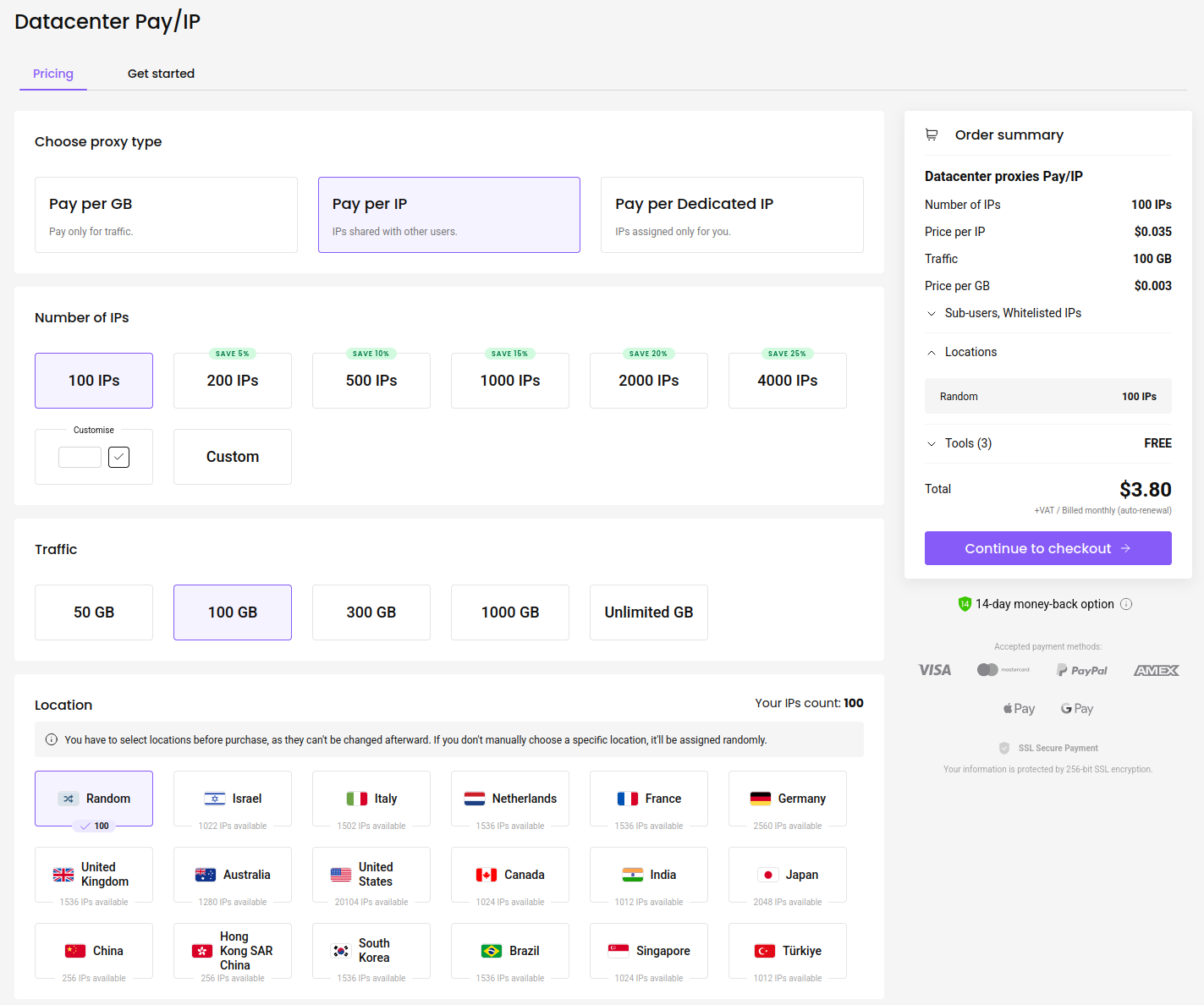
This is pretty cheap. Once you buy your proxies, here is how you can use them:
import requests

REQUEST_COUNT = 29
PROXY_CHANGE_INTERVAL = 5

proxies_list = [
    "http://sp96rgc8yz:[email protected]:10001",
    "http://sp96rgc8yz:[email protected]:10002",
    "http://sp96rgc8yz:[email protected]:10003",
    "http://sp96rgc8yz:[email protected]:10004",
    "http://sp96rgc8yz:[email protected]:10005",
    "http://sp96rgc8yz:[email protected]:10006"
]

url = "http://127.0.0.1:5000/post/announcements/272"
cookies = {
    "session": ".eJwlzjkOwjAQAMC_uKbwru098hmUvQRtQirE30FiXjDvdq8jz0fbXseVt3Z_RtsaLq_dS6iPEovRuyIyhhGoxMppFG5CJEAEy3cuZ9LivWN0nWwyLCZS6tI5h66oWdA9hBADWN14xyrJ6LkmFFj5yjKsMVjbL3Kdefw30D5fvlgvjw.aHE7pQ.HyexRW6P3g7njbSz53vZj77gmMU"
}

proxy_index = 0
request_count = 0

while True:
    current_proxy = proxies_list[proxy_index % len(proxies_list)]
    proxies = {
        "http": current_proxy,
        "https": current_proxy
    }

    response = requests.get(url, cookies=cookies, proxies=proxies)
    print(f"Request number: {request_count + 1} | Proxy: {current_proxy} | HTTP Status code: {response.status_code}")

    request_count += 1
    # Change proxy every 5 requests
    if request_count % PROXY_CHANGE_INTERVAL == 0:
        proxy_index += 1
The program operates in an infinite while True loop, selecting a proxy from the list using a modulo operation (proxy_index % len(proxies_list)) to cycle back to the first proxy after the last one. It applies the selected proxy to both HTTP and HTTPS protocols. After every five requests, it increments proxy_index to switch to the next proxy, restarting from the first proxy when the end of proxies_list is reached.
Captcha bypass
CAPTCHAs are likely the most engaging topic in this module and probably why many of you are here. Just as we analyzed web pages before scraping them, we can study how CAPTCHAs function before bypassing them.
To understand CAPTCHAs, visit the login page where they typically appear:
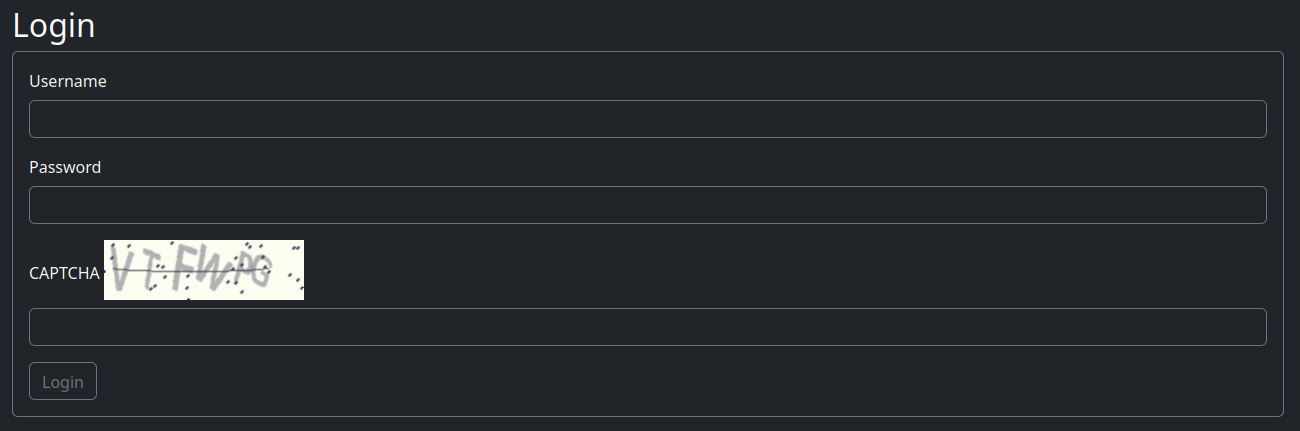
Reload the page several times to observe:
- How many characters does each CAPTCHA use?
6 characters - What types of characters are used (lowercase, uppercase, mixed, numbers)?
All uppercase letters and numbers - What is the CAPTCHA image size?
Download it, open it in Chrome, and note it is 200 pixels wide by 60 pixels high - What is the maximum resolution when resizing the CAPTCHA image?
Resizing improves character readability
Here is a resized version of the login CAPTCHA:

Isn’t this clearer and easier to read?
Here’s how I prompt ChatGPT o3 to extract the text accurately:
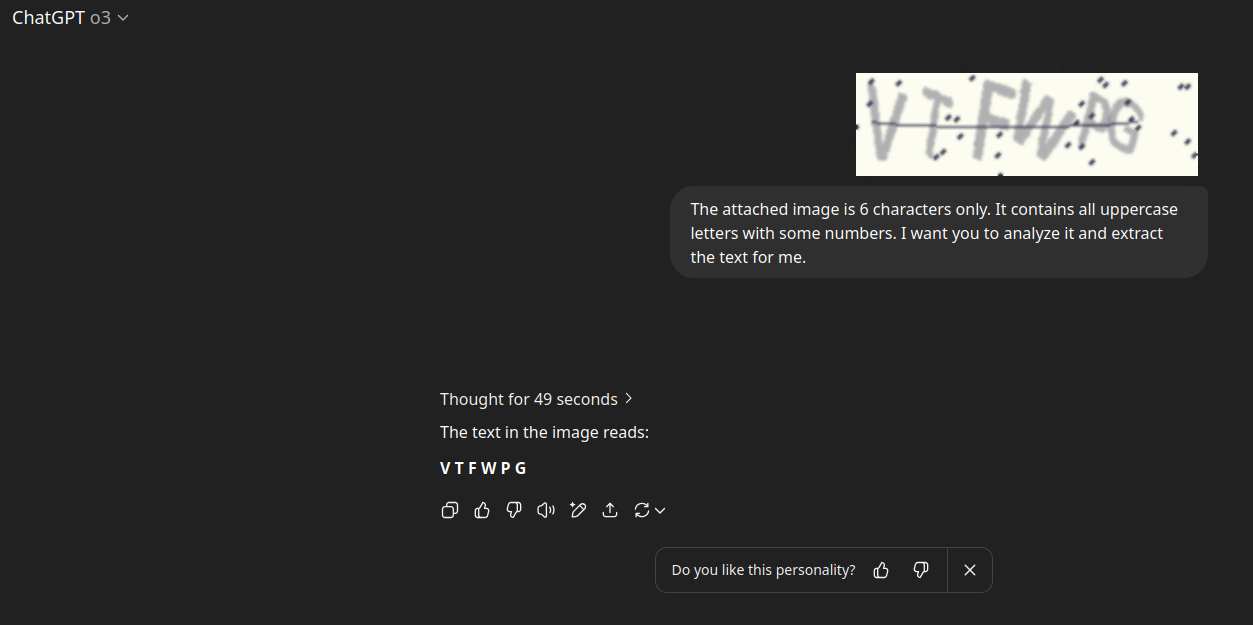
This process can take time, sometimes 49 seconds or up to a minute, but ChatGPT o3’s OCR is thorough, though occasionally inconsistent. You can optionally analyze the CAPTCHA multiple times and select the result with the highest confidence score.
Fortunately, CAPTCHAs are typically only used on login and registration pages in most forums, so extensive bypassing isn’t always necessary. On our main web scraper site, when a bot account is added, we automatically log in, bypass the CAPTCHA, and create a session. If the session expires, we perform re-login using the credentials. If a login fails due to an incorrect CAPTCHA, we retry until successful.
A limitation of using o3 is that its OpenAI API model does not support image processing. We will explore models with image support and API access in later sections.
In upcoming sections, you’ll learn how we use the gpt-4.1 model to perform continuous login attempts, typically succeeding after five consecutive tries, as you’ll discover later.
Account lockout
Account lockouts or bans are typically manual but can sometimes be automated. Many cyber-crime forums combat scammers by blacklisting specific user handles. For instance, posting a Telegram username like @BluePig might trigger an automatic ban.
I’ve observed this frequently, so switching between multiple accounts may not always resolve the issue. However, if you encounter automated lockouts, rotating between accounts is a viable strategy.
Some sites employ automated logging systems that alert admins to suspicious activities, such as excessive requests or potential malicious behavior.
In our main web scraper, we will implement account rotation using multiple bot accounts to avoid lockouts. While the test sites in this course lack account lockout mechanisms, we will teach you how to bypass such protections to prepare you for real-world scenarios.
The following Python code demonstrates switching between two accounts and printing each account’s profile page as a proof of concept for account rotation.
When logged in as DarkHacker, the profile page displays You are logged in as DarkHacker. This message is absent while visiting other users’ profile pages, confirming your login status. Below is how we programmatically verify this by switching between accounts:
import requests


# JSON structure for profiles
profiles = {
    "url": "http://127.0.0.1:5000/profile/",
    "users": {
        "CyberGhost": {
            "cookie": "session=.eJwtzrkRwjAQAMBeFBNIJ-keN-PRfWNSG0cMvUPAVrDvsucZ11G213nHo-xPL1uBabksGWtPVu-1CgCBKzZhnzEU3ZQRuSG2aYvSCCVpVfAqg5S7-gAMmTJGl-k5slVzRgBvJKa0IJPDa8zRsmnajFTI3knKL3Jfcf435fMFvlsvkA.aHFScA.HYZ0jgZ5eb06WP5SzPnnf6pISJo"
        },
        "DarkHacker": {
            "cookie": "session=.eJwlzjkOwjAQAMC_uKbwru098hmUvQRtQirE30FiXjDvdq8jz0fbXseVt3Z_RtsaLq_dS6iPEovRuyIyhhGoxMppFG5CJEAEy3cuZ9LivWN0nWwyLCZS6tI5h66oWdA9hBADWN14xyrJ6LkmFFj5yjKsMVjbL3Kdefw30D5fvlgvjw.aHFR-A.mcu8L_CTLdZrz2254OEzZhsqpbQ"
        }
    }
}

# Function to fetch profile and check for login string
def fetch_profile(username, cookie):
    url = f"{profiles['url']}{username}"
    headers = {'Cookie': cookie}
    try:
        response = requests.get(url, headers=headers)
        # Check for the login confirmation string
        login_string = f"You are logged in as {username}"
        if login_string in response.text:
            print(f"Confirmation: '{login_string}' found in the response for user: {username}.")
        else:
            print(f"Confirmation: '{login_string}' NOT found in the response.")
    except requests.RequestException as e:
        print(f"Error fetching profile for {username}: {e}")

# Fetch profiles for both users
for username, data in profiles['users'].items():
    fetch_profile(username, data['cookie'])
Output:
-> % python3 profile_rotation.py
Confirmation: 'You are logged in as CyberGhost' found in the response for user: CyberGhost.
Confirmation: 'You are logged in as DarkHacker' found in the response for user: DarkHacker.
You can enhance the learning experience by enumerating posts with each account, but the current approach is sufficient. Switching between accounts is an effective strategy to avoid being flagged for suspicious activity, as all requests sent to the website are logged.