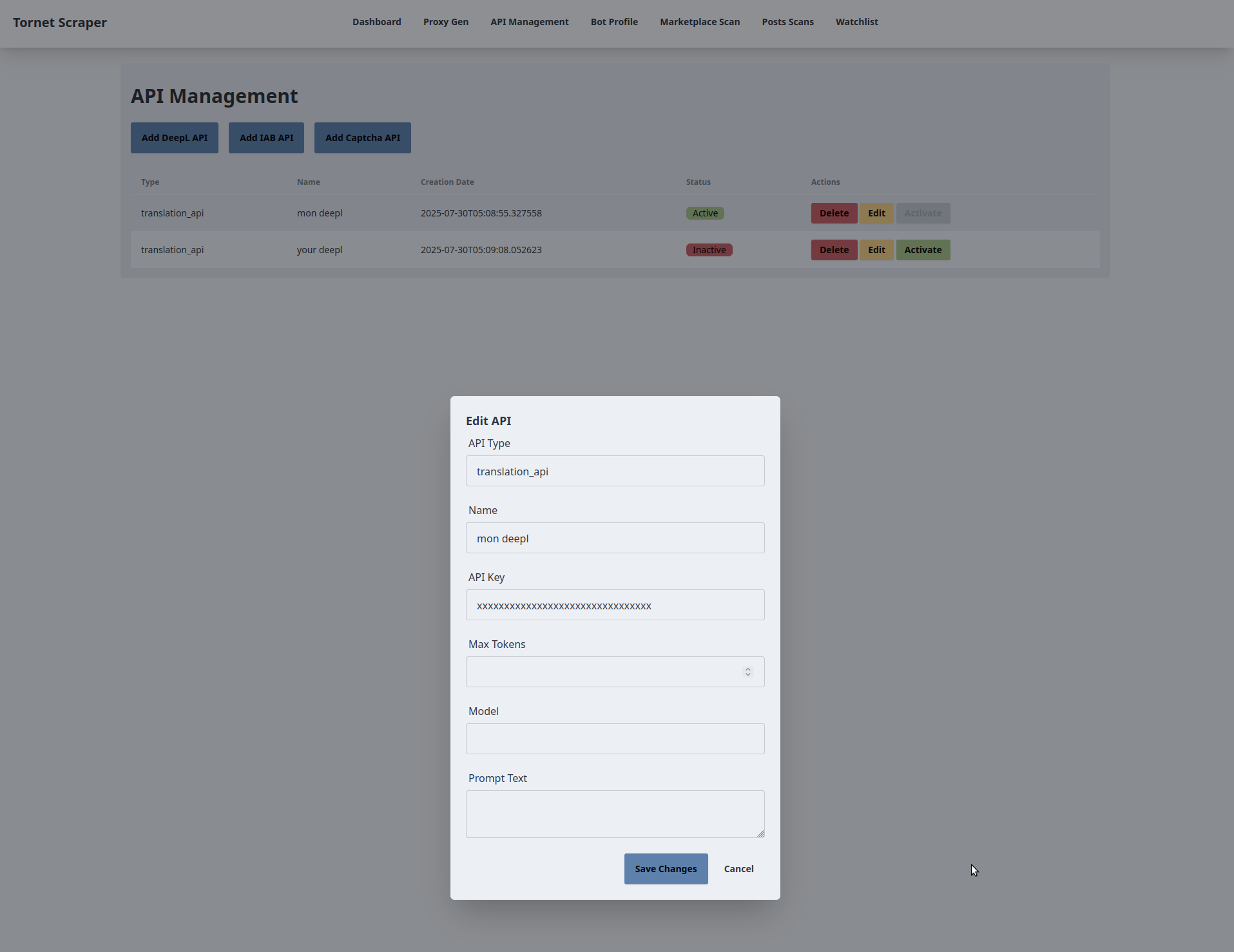
In diesem Abschnitt werden wir die Schnittstelle zur Verwaltung von APIs untersuchen, für die mehrere API-Typen erforderlich sind: einen für DeepL zur Datenübersetzung, einen für die CAPTCHA-Umgehung und einen für die Textanalyse.
Die in diesem Abschnitt behandelten Themen umfassen:
- Datenbankmodelle
- Backend für die API-Verwaltung
- Frontend für die API-Verwaltung
- Testen
Dieses Kapitel ist recht einfach, da es grundlegende CRUD-Operationen vorstellt. CRUD steht für Create, Read, Update und Delete (Erstellen, Lesen, Aktualisieren und Löschen) und bezeichnet grundlegende Operationen in der Anwendungsentwicklung. Tatsächlich basieren die meisten Anwendungen in erster Linie auf CRUD-Funktionen.
Datenbankmodelle
Ihre Modelle befinden sich in app/database/models.py.
So sieht Ihre Tabelle zum Speichern von APIs aus:
class APIs(Base):
    __tablename__ = "apis"
    id = Column(Integer, primary_key=True, index=True)
    api_name = Column(String, unique=True, index=True)
    api_provider = Column(String)
    api_type = Column(String)
    api_key = Column(String)
    model = Column(String)
    prompt = Column(Text)
    max_tokens = Column(Integer)
    timestamp = Column(DateTime, default=datetime.utcnow)
    is_active = Column(Boolean, default=False)
Einige APIs enthalten einen Parameter namens „temperature“, den wir hier jedoch nicht speichern werden. Meiner Erfahrung nach ist die Standardtemperatur von „0,1“ für die meisten Abfragen ausreichend. Sie können jedoch experimentieren, indem Sie eine Temperaturspalte zur Datenbank hinzufügen, was entsprechende Aktualisierungen sowohl im Backend als auch im Frontend erfordern würde.
Backend für die API-Verwaltung
Der Code für die Verwaltung der APIs befindet sich in „app/routes/manage_api.py“. Im Gegensatz zu einigen anderen Routen werden hier keine Dienste oder Scraper-Module verwendet.
Das Skript manage_api.py definiert FastAPI-Routen für die Verwaltung von API-Konfigurationen (z. B. DeepL, Anthropic, OpenAI) in der Anwendung tornet_scraper und interagiert mit der Datenbank, um APIs zu erstellen, zu aktualisieren, zu löschen, aufzulisten und zu aktivieren. Nachfolgend finden Sie eine kurze Erläuterung der wichtigsten Komponenten und Funktionen.
Globale Variablen
-
„logger“:
- Zweck: Konfiguriert die Protokollierung für die Fehlerbehebung und Fehlerverfolgung.
- Details: Verwendet das Modul „logging“ mit der Stufe „INFO“, um Vorgänge und Fehler zu protokollieren.
-
„manage_api_router”:
- Zweck: FastAPI-Router für API-Management-Endpunkte.
- Details: Konfiguriert mit dem Präfix „/api/manage-api” und den Tags „[„API”, „API Management”]” zur Organisation.
Pydantic-Modelle
-
DeepLCreateRequest:- Zweck: Validiert POST-Anfragedaten zum Erstellen einer DeepL-API.
- Felder:
api_name(str),api_key(str).
-
IABCreateRequest:- Zweck: Validiert POST-Anfragedaten zum Erstellen einer Anthropic (IAB)-API.
- Felder:
api_name(str),api_key(str),model(str),max_tokens(int),prompt(str).
-
CaptchaCreateRequest:- Zweck: Validiert POST-Anfragedaten für die Erstellung einer OpenAI (Captcha)-API.
- Felder:
api_name(str),api_key(str),model(str),max_tokens(int),prompt(str).
-
UpdateRequest:- Zweck: Validiert PUT-Anfragedaten zum Aktualisieren einer API.
- Felder:
api_name(str),api_key(str),model(str, optional),max_tokens(int, optional),prompt(str, optional).
Funktionen
-
set_active_api:- Zweck: Aktiviert eine bestimmte API und deaktiviert andere APIs desselben Anbieters.
- Wichtige Parameter:
db: SQLAlchemySessionfür Datenbankoperationen.api_id: Ganzzahlige ID der zu aktivierenden API.api_provider: Zeichenfolge, die den Anbieter identifiziert (z. B.deepl,anthropic).
- Rückgabewert: Keine.
- Details: Setzt das Feld
is_activefür alle APIs desselben Anbieters aufFalse, mit Ausnahme der angegebenenapi_id, die aufTruegesetzt wird. Übernimmt die Änderungen in die Datenbank.
-
create_deepl_api:- Zweck: Erstellt eine neue DeepL-API-Konfiguration.
- Wichtige Parameter:
request:DeepLCreateRequestmit API-Name und Schlüssel.db: SQLAlchemySession.
- Rückgabewert:
JSONResponsemit Erfolgsmeldung. - Details: Überprüft auf doppelte
api_name, erstellt eineAPIs-Modellinstanz (api_provider=„deepl“,api_type=„translation_api“), speichert sie in der Datenbank und gibt eine erfolgreiche Antwort zurück. LöstHTTPExceptionaus (400 für Duplikate, 500 für Fehler).
-
create_iab_api:- Zweck: Erstellt eine neue Anthropic (IAB)-API-Konfiguration.
- Wichtige Parameter:
request:IABCreateRequestmit API-Name, Schlüssel, Modell, maximaler Tokenanzahl und Eingabeaufforderung.db: SQLAlchemySession.
- Rückgabewert:
JSONResponsemit Erfolgsmeldung. - Details: Ähnlich wie
create_deepl_api, setzt jedochapi_provider=„anthropic“undapi_type=„iab_api“. Validiert und speichert zusätzliche Felder (model,max_tokens,prompt).
-
create_captcha_api:- Zweck: Erstellt eine neue OpenAI (Captcha)-API-Konfiguration.
- Wichtige Parameter:
request:CaptchaCreateRequestmit API-Name, Schlüssel, Modell, maximaler Tokenanzahl und Eingabeaufforderung.db: SQLAlchemySession.
- Rückgabewert:
JSONResponsemit Erfolgsmeldung. - Details: Ähnlich wie
create_iab_api, setzt jedochapi_provider=„openai“,api_type=„captcha_api“.
-
list_apis:- Zweck: Ruft alle API-Konfigurationen ab.
- Wichtige Parameter:
db: SQLAlchemySession.
- Rückgabewert: Wörterbuch mit einer Liste von APIs (ID, Name, Anbieter, Typ, Schlüssel, Modell, maximale Tokens, Eingabeaufforderung, Zeitstempel, Aktivstatus).
- Details: Fragt alle
APIs-Datensätze ab und gibt sie als JSON zurück. Löst bei Fehlern eineHTTPException(500) aus.
-
update_api:- Zweck: Aktualisiert eine vorhandene API-Konfiguration.
- Wichtige Parameter:
api_id: Ganzzahlige ID der zu aktualisierenden API.request:UpdateRequestmit aktualisierten Feldern.db: SQLAlchemySession.
- Rückgabewert:
JSONResponsemit Erfolgsmeldung. - Details: Überprüft, ob die API vorhanden ist, sucht nach doppelten
api_name, aktualisiert Felder (nur Nicht-None-Werte fürmodel,max_tokens,prompt) und übernimmt die Änderungen. LöstHTTPExceptionaus (404, wenn nicht gefunden, 400 bei Duplikaten, 500 bei Fehlern).
-
delete_api:- Zweck: Löscht eine API-Konfiguration.
- Wichtige Parameter:
api_id: Ganzzahlige ID der zu löschenden API.db: SQLAlchemySession.
- Rückgabewert:
JSONResponsemit Erfolgsmeldung. - Details: Überprüft, ob die API vorhanden ist, löscht sie aus der Datenbank und führt die Änderung durch. Löst eine
HTTPExceptionaus (404, wenn nicht gefunden, 500 bei Fehlern).
-
activate_api:- Zweck: Aktiviert eine bestimmte API und deaktiviert andere APIs desselben Anbieters.
- Wichtige Parameter:
api_id: Ganzzahlige ID der zu aktivierenden API.db: SQLAlchemySession.
- Rückgabewert:
JSONResponsemit Erfolgsmeldung. - Details: Überprüft, ob die API vorhanden ist, ruft
set_active_apiauf, umis_activeumzuschalten, und gibt eine Erfolgsmeldung zurück. LöstHTTPExceptionaus (404, wenn nicht gefunden, 500 bei Fehlern).
-
get_api:- Zweck: Ruft eine einzelne API-Konfiguration anhand der ID ab.
- Wichtige Parameter:
api_id: Ganzzahlige ID der API.db: SQLAlchemySession.
- Rückgabewerte: Wörterbuch mit API-Details (ID, Name, Anbieter, Typ, Schlüssel, Modell, maximale Tokens, Eingabeaufforderung, Zeitstempel, Aktivstatus).
- Details: Fragt die Tabelle
APIsnach der angegebenen ID ab und gibt deren Details zurück. LöstHTTPExceptionaus (404, wenn nicht gefunden, 500 bei Fehlern).
Frontend for API management
The frontend code is located inside app/templates/manage_api.html.
The manage_api.html template extends base.html to provide a UI for managing API configurations (DeepL, IAB/Anthropic, Captcha/OpenAI) in the tornet_scraper application. It interacts with the backend via API calls to create, update, delete, list, and activate APIs. Below is a concise explanation of its key functionalities and their interaction with the backend.
-
Template Inheritance:
- Purpose: Leverages the
base.htmllayout for consistent structure. - Backend Interaction: Inherits navbar and flash message handling from
base.html. Sets the page title to "API Management" via{% block title %}. Initial API data (apis) is passed frommain.py::manage_apiand rendered into the table using Jinja2. Flash messages from the backend (stored in the session) are displayed in the inherited container.
- Purpose: Leverages the
-
API Creation:
- Purpose: Allows users to add new API configurations for DeepL, IAB, or Captcha services.
- Backend Interaction:
- Three buttons ("Add DeepL API", "Add IAB API", "Add Captcha API") open respective modals (
addDeepLModal,addIABModal,addCaptchaModal) viaopenModal(). - Each modal contains a form with required fields (e.g.,
api_name,api_keyfor DeepL; additionalmodel,max_tokens,promptfor IAB/Captcha). - Form submission triggers
createDeepLAPI(),createIABAPI(), orcreateCaptchaAPI(), sending AJAX POST requests to/api/manage-api/create/deepl,/iab, or/captcha(handled bymanage_api.py::create_deepl_api,create_iab_api,create_captcha_api). - The backend validates the request (using Pydantic models), checks for duplicate
api_name, saves the API to theAPIstable, and returns a success message. On success, a flash message is shown, the modal closes, the form resets, and the table updates. Errors trigger an error flash message.
- Three buttons ("Add DeepL API", "Add IAB API", "Add Captcha API") open respective modals (
-
API Table Display and Updates:
- Purpose: Displays a dynamic list of APIs with real-time status.
- Backend Interaction:
- The table is initially populated with
apisfrommain.py::manage_api, showing API type, name, creation date, and active status. - The
updateTable()function runs every 10 seconds (viasetInterval) and after create/update/delete/activate actions, sending an AJAX GET request to/api/manage-api/list(handled bymanage_api.py::list_apis). - The backend queries the
APIstable and returns a JSON list of APIs (ID, name, provider, type, key, model, max tokens, prompt, timestamp, active status). The table is refreshed with this data, showing "Active" or "Inactive" badges. Errors trigger an error flash message.
- The table is initially populated with
-
API Editing:
- Purpose: Updates existing API configurations.
- Backend Interaction:
- Each table row has an "Edit" button that calls
openEditModal(apiId), sending an AJAX GET request to/api/manage-api/get/{api_id}(handled bymanage_api.py::get_api). - The backend returns the API’s details, which populate the
editAPIModalform. For DeepL APIs, onlyapi_nameandapi_keyfields are shown; for IAB/Captcha, additionalmodel,max_tokens, andpromptfields are displayed. - Form submission triggers
updateAPI(), sending an AJAX PUT request to/api/manage-api/update/{api_id}(handled bymanage_api.py::update_api) with updated fields. The backend validates and updates theAPIstable, returning a success message. On success, a flash message is shown, the modal closes, and the table updates. Errors trigger an error flash message.
- Each table row has an "Edit" button that calls
-
API Deletion:
- Purpose: Deletes an API configuration.
- Backend Interaction:
- Each table row has a "Delete" button that calls
openDeleteModal(apiId), opening thedeleteAPIModalwith the API ID stored in a hidden input. - The "Delete" button triggers
confirmDeleteAPI(), sending an AJAX DELETE request to/api/manage-api/delete/{api_id}(handled bymanage_api.py::delete_api). - The backend verifies the API exists, deletes it from the
APIstable, and returns a success message. On success, a flash message is shown, the modal closes, and the table updates. Errors trigger an error flash message.
- Each table row has a "Delete" button that calls
-
API Activation:
- Purpose: Activates a specific API, deactivating others of the same provider.
- Backend Interaction:
- Each table row has an "Activate" button (disabled if already active) that calls
activateAPI(apiId, apiType), sending an AJAX POST request to/api/manage-api/activate/{api_id}(handled bymanage_api.py::activate_api). - The backend calls
set_active_apito setis_active=Truefor the specified API andFalsefor others of the same provider, committing changes to theAPIstable. On success, a flash message is shown, and the table updates. Errors trigger an error flash message.
- Each table row has an "Activate" button (disabled if already active) that calls
While using Anthropic or OpenAI is not mandatory, I’ve streamlined the process for simplicity. In another app, I implemented support for four different providers, offering dozens of models. However, this level of flexibility is often unnecessary, as it adds complexity to the backend code.
Testing
Here is how you can add two DeepL APIs but activate only one of them at any time.