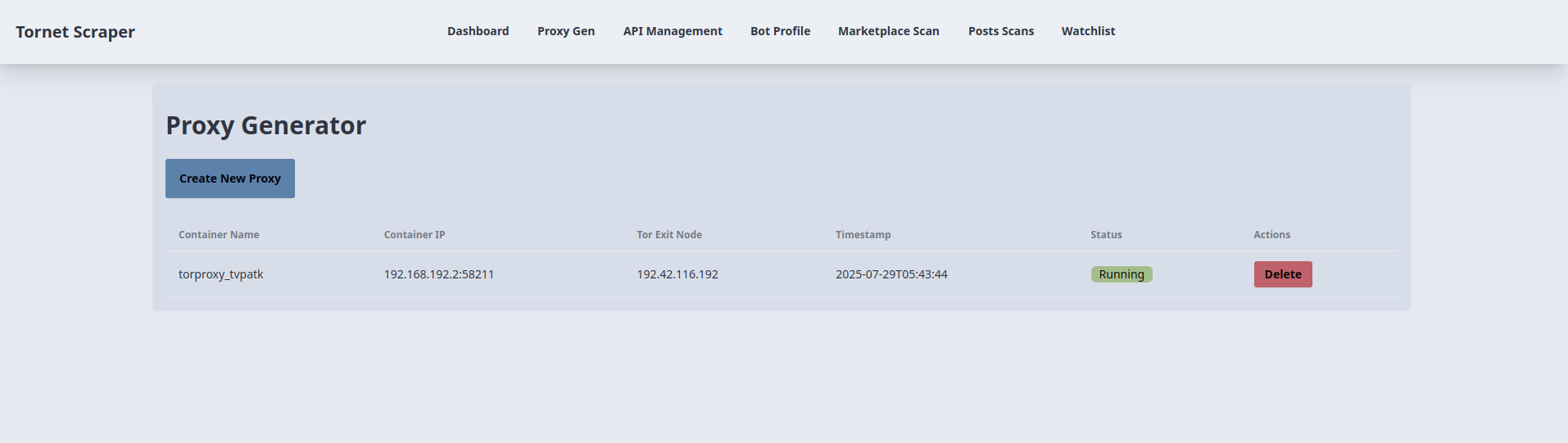
In this section, I will explain how to create a tor proxy generator and implement a web application functionality for keeping track of proxies and managing them.
The topics of this section include the following:
- Tor proxy generator
- Automated tor proxy generation
- Creating proxies
- Checking proxy status
- Deleting proxies
- Database models
- Creating backend
- Creating frontend
- Testing
Tor proxy generator
The following GitHub repository contains code for a tor proxy generator:
https://github.com/0xHamy/tor_proxy_gen
For every proxy, you'd need a separate Docker container or at least that's what I am doing, you can also buy hundreds of proxies for cheap but it doesn't hurt to learn setting it up yourself.
If you look into docker-compose.yaml file in that repository, you can see that we are routing all traffic through port 9050 inside the docker to the host network through port 9050:
services:
  tor:
    build:
      context: .
      dockerfile: Dockerfile
    image: tor-proxy
    ports:
      - "9050:9050"
    container_name: tor-proxy
    restart: unless-stopped
if you wanted to access the proxy through a different port from your host network, you can change ports like this:
3531:9050
The first port is the port that opens on your host system and the second port is one running in Docker.
torrc file uses port 9050 for tor service:
SocksPort 0.0.0.0:9050
Log notice stdout
Dockerfile is running a small version of debian operating system for running the tor proxy:
# Use a lightweight Debian-based image
FROM debian:bullseye-slim

# Install Tor
RUN apt-get update && \
    apt-get install -y tor && \
    rm -rf /var/lib/apt/lists/*

# Copy custom Tor configuration
COPY torrc /etc/tor/torrc

# Expose the Tor SOCKS5 proxy port
EXPOSE 9050

# Run Tor as the main process
CMD ["tor", "-f", "/etc/tor/torrc"]
When it comes to building an app that generates multiple tor proxies, we can't rely on only port 9050 because it gets used so we can't use it if it's already in use by something else. For this reason, we are going to create a python script by choosing a random port between 40,000 to 60,000, there is only 65535 ports in any computer so the reason for that specific port range because it's usually not used from what I have seen, it also doesn't require root permission to use, at least on Ubuntu it doesn't.
Automated tor proxy generation
Since we generate Tor proxies using Docker, we need to implement three core functionalities:
- A function to create a Docker container for running a Tor proxy
- A function to check the status of a Docker container to verify if the proxy is active
- A function to shut down and remove a Docker container
The relevant files are located in app/services/*.py. The specific files we will use are:
tor_proxy_gen.py: Handles the creation of Docker containers for Tor proxiescontainer_status.py: Checks the status of Docker containersrm_container.py: Manages the deletion of Docker containers
Creating proxies
The tor_proxy_gen.py script automates the creation of Docker containers running Tor proxies, providing a SOCKS5 proxy for anonymous network access. Below is a concise explanation of its components and functionality.
Purpose:
- Creates and starts a Docker container running a Tor proxy, assigns a random port, retrieves the container’s IP and Tor exit node IP, and returns the details as a JSON-ready dictionary.
Global Variables:
PORT_MIN,PORT_MAX:- Purpose: Define the range (40001–60001) for selecting random host ports.
- Details: Ensures unique port assignment for each container.
SOCKS_PORT_IN_CONTAINER:- Purpose: Sets the Tor SOCKS port inside the container (9050).
- Details: Standard port for Tor’s SOCKS5 proxy.
MAX_PORT_ATTEMPTS:- Purpose: Limits attempts to find a free port (100).
- Details: Prevents infinite loops in port selection.
WAIT_MAX_SECONDS,WAIT_STEP_SECONDS:- Purpose: Control timeout (60s) and polling interval (2s) for port readiness.
- Details: Used when waiting for the container’s port to open.
DOCKERFILE,TORRC,COMPOSE_TEMPLATE:- Purpose: Define Docker configuration files as strings.
- Details:
DOCKERFILEsets up a Debian-based image with Tor;TORRCconfigures Tor’s SOCKS port;COMPOSE_TEMPLATEdefines Docker Compose settings for the container.
Functions:
-
die:- Purpose: Logs an error message and exits the program.
- Key Parameters:
msg(error message),code(exit code, default 1). - Returns: None (exits program).
- Details: Outputs error to stderr and logs it via
logging.
-
cmd_exists:- Purpose: Checks if an executable (e.g.,
docker) is available in$PATH. - Key Parameters:
executable(command name). - Returns: Boolean (
Trueif found). - Details: Uses
shutil.whichand logs the result.
- Purpose: Checks if an executable (e.g.,
-
docker_compose_available:- Purpose: Verifies if Docker Compose is available.
- Key Parameters: None.
- Returns: Boolean (
Trueifdocker compose versionsucceeds). - Details: Runs a command to check for Docker Compose and logs output or errors.
-
is_port_free:- Purpose: Checks if a TCP port on
127.0.0.1is unused. - Key Parameters:
port(port number). - Returns: Boolean (
Trueif port is free). - Details: Attempts to connect to the port using a socket with a 0.5s timeout.
- Purpose: Checks if a TCP port on
-
random_free_port:- Purpose: Finds a random, unused port in the defined range.
- Key Parameters: None.
- Returns: Integer (free port number).
- Details: Tries up to
MAX_PORT_ATTEMPTSrandom ports; callsdieif none are free.
-
random_container_name:- Purpose: Generates a unique container name.
- Key Parameters: None.
- Returns: String (e.g.,
torproxy_abcdef). - Details: Combines
torproxy_with six random lowercase letters.
-
wait_for_port:- Purpose: Waits until a port on a host is open or times out.
- Key Parameters:
host(IP),port(port number),timeout(seconds). - Returns: None (raises
RuntimeErroron timeout). - Details: Polls every
WAIT_STEP_SECONDSuntil the port is used ortimeoutexpires.
-
fetch_tor_exit_ip:- Purpose: Retrieves the Tor exit node IP via external services.
- Key Parameters:
host_port(proxy port),timeout(request timeout, default 15s). - Returns: String (exit node IP).
- Details: Queries IP-echo services (e.g.,
checkip.amazonaws.com) via SOCKS5 proxy; raisesRuntimeErrorif all fail.
-
create_and_start_proxy:- Purpose: Creates and starts a Tor proxy container, returning its details.
- Key Parameters: None.
- Returns: Dictionary with
container_name,container_ip(with port),tor_exit_node, andtimestamp. - Details:
- Checks for Docker and Compose availability; exits if missing.
- Generates a random container name and port.
- Creates a temporary directory with
Dockerfile,torrc, andcompose.yaml. - Runs
docker compose up --build -dto start the container. - Waits for the port to open, retrieves the container’s IP via
docker inspect, and fetches the Tor exit IP. - Cleans up the container on failure using
docker rm -f.
On my machine, Docker requires sudo for root permissions. Running tor_proxy_gen.py with sudo python3 tor_proxy_gen.py uses the system-wide Python interpreter, which bypasses the virtual environment containing the tornet_scraper project’s dependencies.
Instead, run the script as follows to use the virtual environment’s Python interpreter:
-> % sudo /home/hamy/tornet_scraper/venv/bin/python3 app/services/tor_proxy_gen.py
[sudo] password for hamy:
{
  "container_name": "torproxy_tucgye",
  "proxy_ip_docker": "192.168.128.2:45364",
  "proxy_ip_exit_node": "185.193.52.180",
  "timestamp": 1752431067
}
This ensures the script uses the tornet_scraper virtual environment’s Python interpreter with all required dependencies installed.
Checking proxy status
The container_status.py script provides utility functions to check the status of Docker containers. Below is a concise explanation of its functions.
-
cmd_exists:- Purpose: Checks if a specified executable is available in the system’s
$PATH. - Key Parameters:
executable: String name of the command (e.g.,docker).
- Returns: Boolean (
Trueif the executable is found,Falseotherwise). - Details: Uses
shutil.whichto verify if the executable exists and is accessible in the system’s$PATH.
- Purpose: Checks if a specified executable is available in the system’s
-
container_running:- Purpose: Determines if a Docker container is running.
- Key Parameters:
name: String name of the Docker container.
- Returns: Boolean (
Trueif the container exists and is running,Falseotherwise). - Details: Executes
sudo docker inspect -f {{.State.Running}} <name>to check the container’s running state. ReturnsTrueif the output is"true",Falseif the command fails (e.g., container doesn’t exist) or the state is not running. Suppresses stderr withDEVNULLto avoid error output.
Deleting proxies
The rm_container.py script provides a function to forcibly remove a Docker container. Below is a concise explanation of its sole function.
-
delete_container:- Purpose: Deletes a specified Docker container using
sudo docker rm -f. - Key Parameters:
name: String name of the Docker container to remove.
- Returns: Boolean (
Trueif removal succeeds,Falseif it fails). - Details: Executes
sudo docker rm -f <name>to forcibly remove the container, suppressing both stdout and stderr withDEVNULL. ReturnsTrueif the command succeeds, orFalseif aCalledProcessErroroccurs (e.g., container doesn’t exist or permission issues).
- Purpose: Deletes a specified Docker container using
Database models
This is what your database models looks like:
class Proxy(Base):
    __tablename__ = "proxies"

    id = Column(Integer, primary_key=True, index=True)
    container_name = Column(String, unique=True, index=True)
    container_ip = Column(String)
    tor_exit_node = Column(String)
    timestamp = Column(DateTime, default=datetime.utcnow)
    running = Column(Boolean, default=True)
To some of you, datetime.utcnow may appear as deprecated but you don't need to worry about that.
Creating backend
The services modules do all the heavy lifting but we still need a backend router to call those functions and handle requests from the frontend. Your backend for proxy generation is inside app/routes/proxy_gen.py.
The proxy_gen.py script defines FastAPI routes for creating, deleting, and listing Tor proxy containers, interacting with the database and external services. Below is a concise explanation of its components and functions.
Global Variables
logger:- Purpose: Configures logging for debugging and error tracking.
- Details: Uses
loggingmodule withINFOlevel to log operations and errors.
proxy_gen_router:- Purpose: FastAPI router for proxy-related endpoints.
- Details: Configured with prefix
/api/proxy-genand tags["API", "Proxy Generator"]for organization.
Functions
-
create_proxy:- Purpose: Creates a new Tor proxy container and stores its details in the database.
- Key Parameters:
request: FastAPIRequestobject for session management.db: SQLAlchemySessionfor database operations (viaDepends(get_db)).
- Returns:
JSONResponsewith success status, message, and proxy details (container name, IP, Tor exit node, timestamp, running status). - Details: Calls
create_and_start_proxy(fromtor_proxy_gen.py) to start a container, creates aProxymodel instance, saves it to the database, and returns a JSON response. RaisesHTTPException(500) on errors, logging the issue.
-
delete_proxy:- Purpose: Deletes a specified Tor proxy container and its database record.
- Key Parameters:
container_name: String name of the container to delete.request: FastAPIRequestobject for session-based flash messages.db: SQLAlchemySessionfor database operations.
- Returns:
JSONResponsewith success status and message on successful deletion. - Details: Queries the
Proxytable for the container; if found, callsdelete_container(fromrm_container.py) to remove it. Deletes the database record on success and adds a success flash message to the session. RaisesHTTPException(404 if not found, 500 on errors) and adds error flash messages.
-
list_proxies:- Purpose: Retrieves a list of all proxies with updated running status.
- Key Parameters:
db: SQLAlchemySessionfor database operations.
- Returns:
JSONResponsewith a list of proxies, each containing container name, IP, Tor exit node, timestamp, and running status. - Details: Queries all
Proxyrecords, checks each container’s running status usingcontainer_running(fromcontainer_status.py), updates therunningfield in the database if needed, and returns the list as JSON. RaisesHTTPException(500) on errors, logging the issue.
Creating frontend
Your template code is located inside app/templates/proxy_gen.html.
The proxy_gen.html template extends base.html to provide a UI for managing Tor proxy containers in the tornet_scraper application, interacting with the backend via API calls. Below is a concise explanation of its key functionalities and their interaction with the backend.
-
Template Inheritance:
- Purpose: Leverages the
base.htmllayout for consistent structure. - Backend Interaction: Inherits navbar and flash message handling from
base.html. The{% block title %}sets the page title to "Proxy Generator", and{% block content %}defines page-specific functionality. Flash messages from the backend (stored in the session) are displayed in the inherited container.
- Purpose: Leverages the
-
Proxy Creation:
- Purpose: Initiates and confirms the creation of a new Tor proxy container.
- Backend Interaction:
- A "Create New Proxy" button triggers the
createProxy()JavaScript function, opening a confirmation modal. - The modal’s "Proceed" button calls
confirmCreateProxy(), sending an AJAX POST request to/api/proxy-gen/create(handled byproxy_gen.py::create_proxy). - The backend creates a Docker container (via
tor_proxy_gen.py), saves the proxy details (container name, IP, Tor exit node, timestamp, running status) to theProxytable in the database, and returns a JSON response. - On success, the table is updated via
updateProxyTable(). Errors trigger console logs and re-enable the button.
- A "Create New Proxy" button triggers the
-
Proxy Table Display and Updates:
- Purpose: Displays a dynamic list of proxies with real-time status updates.
- Backend Interaction:
- On page load, Jinja2 renders initial proxy data (
proxiesfrommain.py::proxy_gen) into a table with columns for container name, IP, Tor exit node, timestamp, and status. - The
updateProxyTable()function runs every 10 seconds (viasetInterval) and on creation/deletion, sending an AJAX GET request to/api/proxy-gen/list(handled byproxy_gen.py::list_proxies). - The backend queries the
Proxytable, checks each container’s running status (viacontainer_status.py::container_running), updates the database if needed, and returns a JSON list of proxies. - The table is cleared and repopulated with the latest data, showing status as "Running" or "Not Running" with styled badges.
- On page load, Jinja2 renders initial proxy data (
-
Proxy Deletion:
- Purpose: Allows users to delete a proxy container.
- Backend Interaction:
- Each table row has a "Delete" button that calls
openDeleteModal(containerName)to open a confirmation modal with the container name stored in a hidden input. - The modal’s "Delete" button triggers
confirmDeleteProxy(), sending an AJAX DELETE request to/api/proxy-gen/delete/{container_name}(handled byproxy_gen.py::delete_proxy). - The backend verifies the proxy exists in the
Proxytable, deletes the container (viarm_container.py::delete_container), removes the database record, and adds a success flash message to the session. - On success, a success flash message is displayed (via
showFlashMessage), and the table updates. Errors trigger an error flash message.
- Each table row has a "Delete" button that calls
Testing
Run the web app:
sudo /home/hamy/tornet_scraper/venv/bin/python3 -m uvicorn app.main:app --reload
Open the web app:
http://127.0.0.1:8000/proxy-gen
Create a proxy: