In this section, I will explain how to continuously monitor threats over an extended period without manual intervention. The objective is straightforward: create targets with specific priorities, defining the type of data to scrape and the frequency of monitoring.
This module is the closest I can legally come to teaching surveillance techniques. My intent is not to promote surveillance; however, monitoring is a standard practice in threat intelligence. Many law enforcement threat intelligence suites include cross-platform monitoring across multiple forums and sites to track user activity, but we will not explore that level of complexity here.
The topics of this section include the following:
- Profile scraper components
- Database models
- Watchlist backend
- Template for creating watchlists
- Template for displaying results of watchlist
- Testing
Profile scraper components
In the tornet_forum, user profiles display comments and posts in a table, allowing us to view all user activity and access links to posts they’ve commented on or created.
Here’s an example of a profile page:

In app/scrapers/profile_scraper.py, the scrape_profile function accepts a parameter called scrape_option, which defines the scraping priority: everything, comments only, or posts only.
Profile data is scraped based on specified frequencies, such as every 5 minutes, 1 hour, or 24 hours.
1. scrape_profile:
- Purpose: Scrapes profile details, posts, and comments from a specified profile URL using web scraping with BeautifulSoup.
- Key Parameters:
url: URL of the profile page to scrape.session_cookie: Authentication cookie for accessing the page.user_agent: User agent string for HTTP request headers.tor_proxy: Proxy address for Tor routing .scrape_option: Specifies what to scrape: 'comments', 'posts', or 'everything' (default).
- Returns: JSON-serializable dictionary with profile details, posts, comments, and their counts, or an error dictionary if scraping fails.
Later, we will use this function to scrape profile data. Note that we focus on extracting post titles, URLs, and timestamps, not the full content of posts or comments.
Database models
We require two tables: one to manage all targets and another to store data for each target.
You can find these tables defined in app/database/models.py:
class Watchlist(Base):
    __tablename__ = "watchlists"

    id = Column(Integer, primary_key=True, index=True)
    target_name = Column(String, unique=True, index=True)
    profile_link = Column(String)
    priority = Column(String)
    frequency = Column(String)
    timestamp = Column(DateTime, default=datetime.utcnow)


class WatchlistProfileScan(Base):
    __tablename__ = "watchlist_profile_scans"
    id = Column(Integer, primary_key=True, index=True)
    watchlist_id = Column(Integer, ForeignKey("watchlists.id"), nullable=False)
    scan_timestamp = Column(DateTime, default=datetime.utcnow)
    profile_data = Column(JSON)
We store all user profile data as a single, comprehensive JSON string.
Watchlist backend
The backend code is located in app/routes/watchlist.py. While the code is substantial and complex, focus on the following two key dictionaries:
# Map stored frequency values to labels
FREQUENCY_TO_LABEL = {
    "every 5 minutes": "critical",
    "every 1 hour": "very high",
    "every 6 hours": "high",
    "every 12 hours": "medium",
    "every 24 hours": "low"
}

# Map frequency labels to intervals (in seconds)
FREQUENCY_MAP = {
    "critical": 5 * 60,
    "very high": 60 * 60,
    "high": 6 * 60 * 60,
    "medium": 12 * 60 * 60,
    "low": 24 * 60 * 60
}
Frequency determines how often we scrape profiles. A critical priority triggers scans every 5 minutes, whereas a low priority indicates a less urgent target, with profiles scraped every 24 hours.
Core Functions in watchlist.py
-
schedule_all_tasks(db: Session):- Purpose: Schedules scraping tasks for all watchlist items during application startup.
- Functionality: Queries all
Watchlistitems from the database and callsschedule_taskfor each item to set up periodic scraping jobs. - Key Parameters:
db: SQLAlchemy database session.
- Returns: None. Logs the number of scheduled tasks or errors.
- Notes: Handles exceptions to prevent startup failures and logs errors for debugging.
-
schedule_task(db: Session, watchlist_item: Watchlist):- Purpose: Schedules a recurring scraping task for a specific watchlist item.
- Functionality: Maps the item’s frequency to an interval (e.g., "every 24 hours" to 86,400 seconds) and schedules a job using APScheduler to run
scrape_and_saveat the specified interval. - Key Parameters:
db: SQLAlchemy database session.watchlist_item:Watchlistobject containing item details.
- Returns: None. Logs scheduling details (e.g., item ID, interval).
- Notes: Uses
FREQUENCY_TO_LABELandFREQUENCY_MAPfor frequency-to-interval mapping.
-
scrape_and_save(watchlist_id: int, db: Session = None):- Purpose: Performs a single scraping operation for a watchlist item and saves the results.
- Functionality: Retrieves the watchlist item and a random bot with
SCRAPE_PROFILEpurpose from the database, callsscrape_profilewith bot credentials, and stores the result inWatchlistProfileScan. Creates a new database session if none provided. - Key Parameters:
watchlist_id: ID of the watchlist item to scrape.db: Optional SQLAlchemy database session.
- Returns: None. Logs success, errors, or empty results and commits data to the database.
- Notes: Handles session cookie parsing, validates scrape results, and ensures proper session cleanup.
-
get_watchlist(db: Session):- Purpose: Retrieves all watchlist items.
- Functionality: Queries the
Watchlisttable and returns all items as a list ofWatchlistResponseobjects. - Key Parameters:
db: SQLAlchemy database session (viaDepends(get_db)).
- Returns: List of
WatchlistResponseobjects. - Notes: Raises an HTTP 500 error with logging if the query fails.
-
get_watchlist_item(item_id: int, db: Session):- Purpose: Retrieves a single watchlist item by ID.
- Functionality: Queries the
Watchlisttable for the specifieditem_idand returns the item as aWatchlistResponseobject. - Key Parameters:
item_id: ID of the watchlist item.db: SQLAlchemy database session.
- Returns:
WatchlistResponseobject or raises HTTP 404 if not found. - Notes: Logs errors and raises HTTP 500 for unexpected issues.
-
create_watchlist_item(item: WatchlistCreate, db: Session):- Purpose: Creates a new watchlist item and schedules its scraping task.
- Functionality: Validates that the
target_nameis unique, creates aWatchlistentry, runs an immediate scan if no scans exist, and schedules future scans usingschedule_task. - Key Parameters:
item: PydanticWatchlistCreatemodel with item details.db: SQLAlchemy database session.
- Returns:
WatchlistResponseobject for the created item. - Notes: Raises HTTP 400 if
target_nameexists, HTTP 500 for other errors.
-
update_watchlist_item(item_id: int, item: WatchlistUpdate, db: Session):- Purpose: Updates an existing watchlist item and reschedules its scraping task.
- Functionality: Verifies the item exists and
target_nameis unique (excluding the current item), updates fields, and callsschedule_taskto adjust the scraping schedule. - Key Parameters:
item_id: ID of the watchlist item.item: PydanticWatchlistUpdatemodel with updated details.db: SQLAlchemy database session.
- Returns: Updated
WatchlistResponseobject. - Notes: Raises HTTP 404 if item not found, HTTP 400 for duplicate
target_name, or HTTP 500 for errors.
-
delete_watchlist_item(item_id: int, db: Session):- Purpose: Deletes a watchlist item and its associated scans.
- Functionality: Removes the item from
Watchlist, its scans fromWatchlistProfileScan, and the corresponding APScheduler job. - Key Parameters:
item_id: ID of the watchlist item.db: SQLAlchemy database session.
- Returns: JSON response with success message.
- Notes: Raises HTTP 404 if item not found, HTTP 500 for errors. Ignores missing scheduler jobs.
-
get_profile_scans(watchlist_id: int, db: Session):- Purpose: Retrieves all scan results for a watchlist item.
- Functionality: Queries
WatchlistProfileScanfor scans matchingwatchlist_id, ordered by timestamp (descending), and returns them asWatchlistProfileScanResponseobjects. - Key Parameters:
watchlist_id: ID of the watchlist item.db: SQLAlchemy database session.
- Returns: List of
WatchlistProfileScanResponseobjects. - Notes: Raises HTTP 500 for query errors.
-
download_scan(scan_id: int, db: Session):- Purpose: Downloads a scan’s profile data as a JSON file.
- Functionality: Retrieves the scan by
scan_id, writes itsprofile_datato a temporary JSON file, and returns it as aFileResponse. - Key Parameters:
scan_id: ID of the scan to download.db: SQLAlchemy database session.
- Returns:
FileResponsewith the JSON file. - Notes: Raises HTTP 404 if scan not found, HTTP 500 for errors.
-
startup_event():- Purpose: Initializes the APScheduler on application startup.
- Functionality: Checks if the scheduler is not running, creates a database session, calls
schedule_all_tasksto schedule all watchlist items, and starts the scheduler. - Key Parameters: None.
- Returns: None. Logs scheduler status.
- Notes: Ensures the scheduler starts only once to avoid duplicate jobs.
If you're not satisfied with the default frequencies, you can modify them in watchlist.py. For consistency, you’ll also need to update the templates accordingly. However, if you’re adjusting frequencies for debugging purposes, you can modify them solely in watchlist.py without altering the templates.
Template for creating watchlists
The template we'll use is a straightforward CRUD table, keeping it simple and functional. You can review it by opening app/templates/watchlist.html.
-
Watchlist Item Creation:
- Purpose: Adds a new watchlist item for monitoring a target profile.
- Backend Interaction:
- The "New Threat" button opens a modal (
newThreatModal) with fields for target name, profile link (URL), priority (everything,posts,comments), and frequency (every 24 hours,every 12 hours, etc.). - Form submission (
newThreatForm) validates the profile link and sends an AJAX POST request to/api/watchlist-api/items(handled bywatchlist_api_router) with form data. - The backend creates a
Watchlistrecord, saves it to the database, and returns a success response. On success, the modal closes, the form resets, andloadWatchlist()refreshes the table. Errors trigger an alert.
- The "New Threat" button opens a modal (
-
Watchlist Item Listing and Refresh:
- Purpose: Displays and updates a table of watchlist items.
- Backend Interaction:
- The
loadWatchlist()function, called on page load and by the "Refresh Table" button, sends an AJAX GET request to/api/watchlist-api/items(handled bywatchlist_api_router). - The backend returns a list of
Watchlistrecords (ID, target name, profile link, priority, frequency, timestamp). The table is populated with these details, showing "No items found" if empty. Errors trigger an alert and display a failure message in the table.
- The
-
Watchlist Item Editing:
- Purpose: Updates an existing watchlist item.
- Backend Interaction:
- Each table row’s "Edit" button fetches item data via an AJAX GET request to
/api/watchlist-api/items/{id}(handled bywatchlist_api_router) and populates theeditThreatModalwith current values. - Form submission (
editThreatForm) validates the profile link and sends an AJAX PUT request to/api/watchlist-api/items/{id}with updated data. - The backend updates the
Watchlistrecord. On success, the modal closes, andloadWatchlist()refreshes the table. Errors trigger an alert.
- Each table row’s "Edit" button fetches item data via an AJAX GET request to
-
Watchlist Item Deletion:
- Purpose: Deletes a watchlist item.
- Backend Interaction:
- Each table row’s "Delete" button prompts for confirmation and sends an AJAX DELETE request to
/api/watchlist-api/items/{id}(handled bywatchlist_api_router). - The backend removes the
Watchlistrecord. On success,loadWatchlist()refreshes the table. Errors trigger an alert.
- Each table row’s "Delete" button prompts for confirmation and sends an AJAX DELETE request to
-
Viewing Watchlist Results:
- Purpose: Redirects to a results page for a watchlist item’s profile.
- Backend Interaction:
- Each table row’s "View Results" button links to
/watchlist-profile/{id}(handled bymain.py::watchlist_profile). - The backend renders a template with results from the
Watchlistitem’s monitoring data (e.g., posts or comments). No direct AJAX call is made, but the redirect relies on backend data retrieval.
- Each table row’s "View Results" button links to
Template for displaying results of watchlist
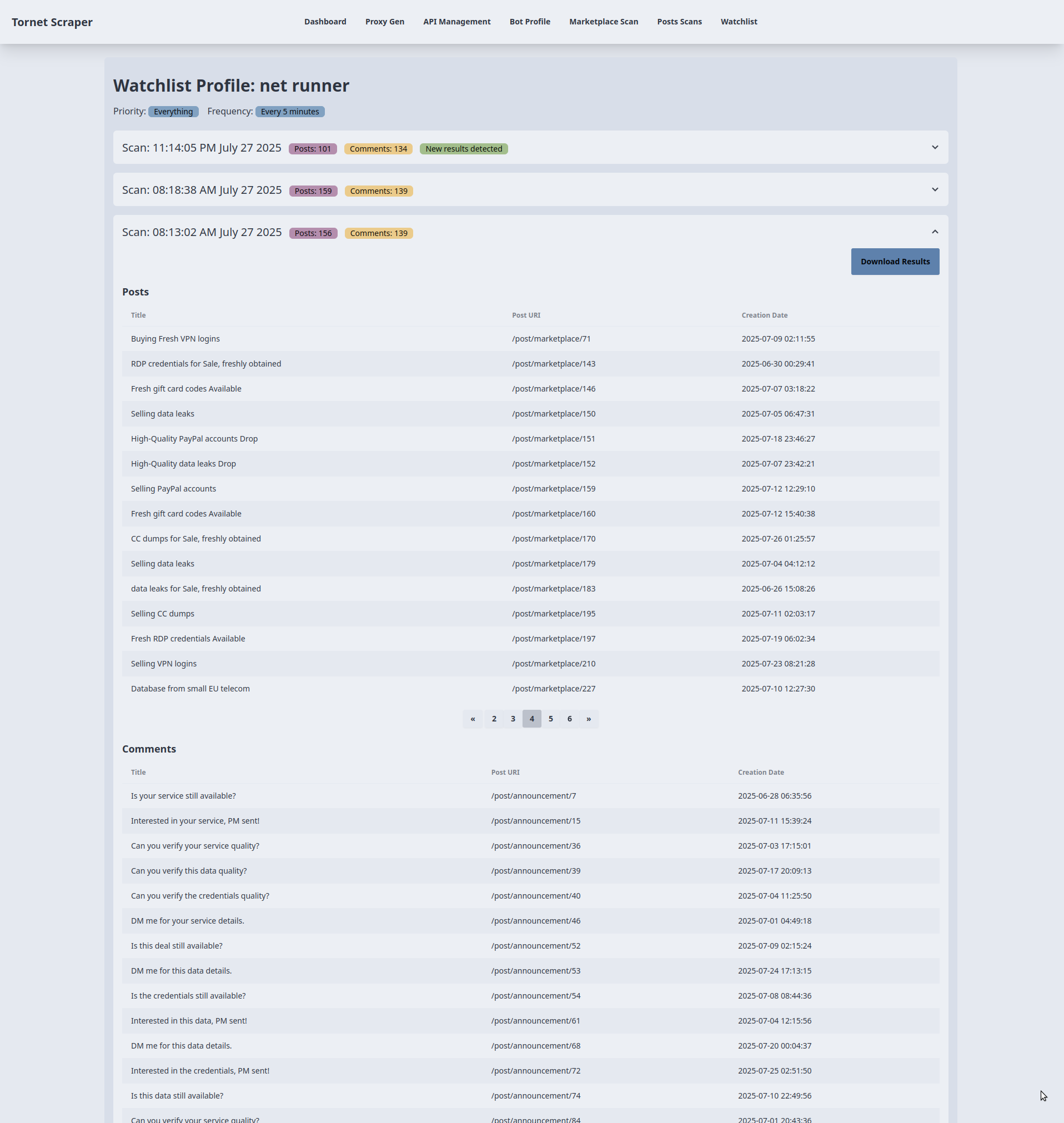
We require a dedicated template to display results for each target, as we handle a large volume of data that needs to be organized by date for clarity.
-
Displaying Scan Results:
- Purpose: Shows scan results for a watchlist item in accordion sections.
- Backend Interaction:
- The template receives
watchlist_item(target name, priority, frequency) andscans(list of scan data withprofile_datacontaining posts and comments) frommain.py::watchlist_profile. - Each accordion represents a scan, displaying the scan timestamp, post count, and comment count (from
profile_data). A "New results detected" badge appears if the latest scan’s post or comment count differs from the previous scan. Data is rendered using Jinja2 without additional API calls.
- The template receives
-
Posts and Comments Tables:
- Purpose: Displays up to 15 posts and comments per scan in separate tables.
- Backend Interaction:
- For each scan, posts (
profile_data.posts) and comments (profile_data.comments) are rendered into tables with columns for title, URL, and creation date (or comment text for comments). If no data exists, a "No posts/comments found" message is shown. - Data is preloaded from the backend via
main.py::watchlist_profile, requiring no further API requests for table rendering.
- For each scan, posts (
-
Pagination for Large Datasets:
- Purpose: Handles pagination for scans with more than 15 posts or comments.
- Backend Interaction:
- For tables exceeding 15 items, a pagination button group is rendered with up to 5 page buttons, using
data-items(JSON-encoded posts/comments) anddata-total-pagesfromprofile_data.post_countorcomment_count. - The
changePage()function manages client-side pagination, slicing the JSON data to display 15 items per page without additional backend calls. It dynamically updates page buttons and table content based on user navigation (prev/next or page number clicks).
- For tables exceeding 15 items, a pagination button group is rendered with up to 5 page buttons, using
-
Downloading Scan Results:
- Purpose: Exports scan results as a file.
- Backend Interaction:
- Each scan accordion includes a "Download Results" button linking to
/api/watchlist-api/download-scan/{scan.id}(handled bywatchlist_api_router). - The backend generates a downloadable file (e.g., JSON or CSV) containing the scan’s
profile_data(posts and comments). The link triggers a direct download without AJAX, relying on backend processing.
- Each scan accordion includes a "Download Results" button linking to
I chose accordions to organize scan results by timestamp, as I believe this is the most effective approach for managing large datasets. While you may prefer a different method, the accordion format provides a clear and efficient display.
You don’t need to modify the template, as you can export the data as JSON and visualize it in any format outside of tornet_scraper.
Testing
To begin testing, configure the following components:
- Set up an API for CAPTCHA solving.
- Create a bot profile with the purpose set to
scrape_profileand perform login to obtain a session. - Create a watchlist using the
/watchlistpage.
To create a watchlist for monitoring a threat, provide the following:
- Target Name: Any identifier for the threat.
- Profile Link: In the format
http://z3zpjsqox4dzxkrk7o34e43cpnc5yrdkywumspqt2d5h3eibllcmswad.onion/profile/N3tRunn3r.
Navigate to the Watchlist menu, click New Threat, and enter the details. When adding a target for the first time, the modal may briefly pause as the backend initiates an initial scan. This initial scan on target creation is not the default behavior of the task scheduler in watchlist.py but is a custom feature I implemented.
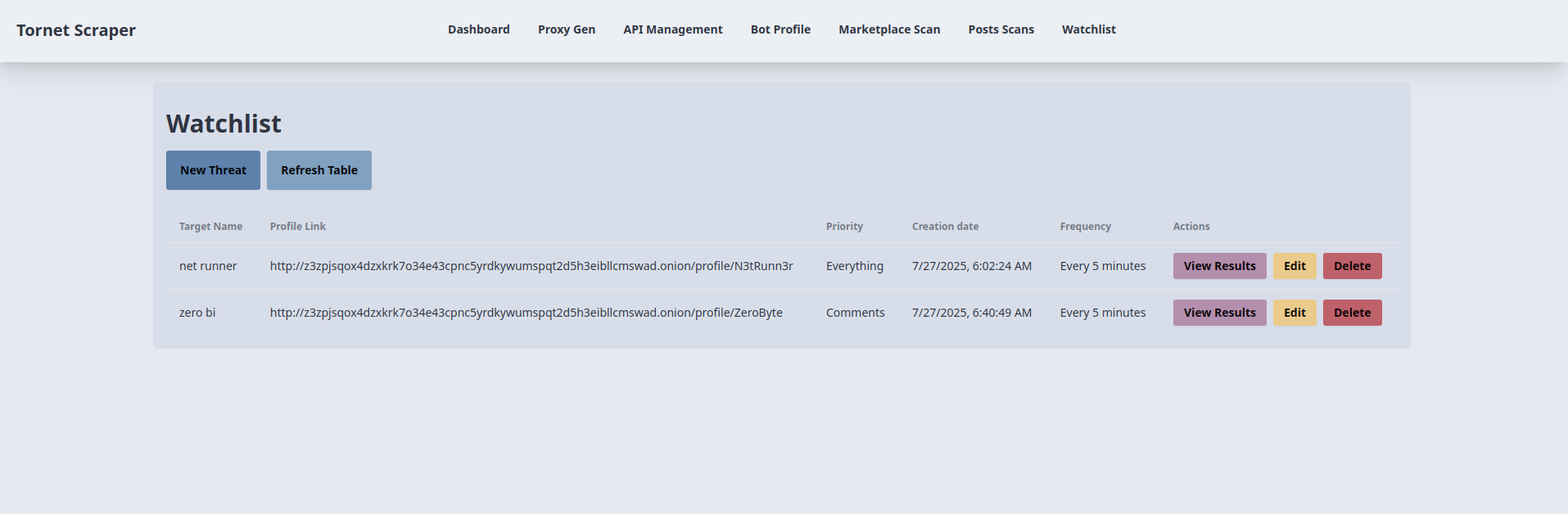
Here’s how targets are displayed:
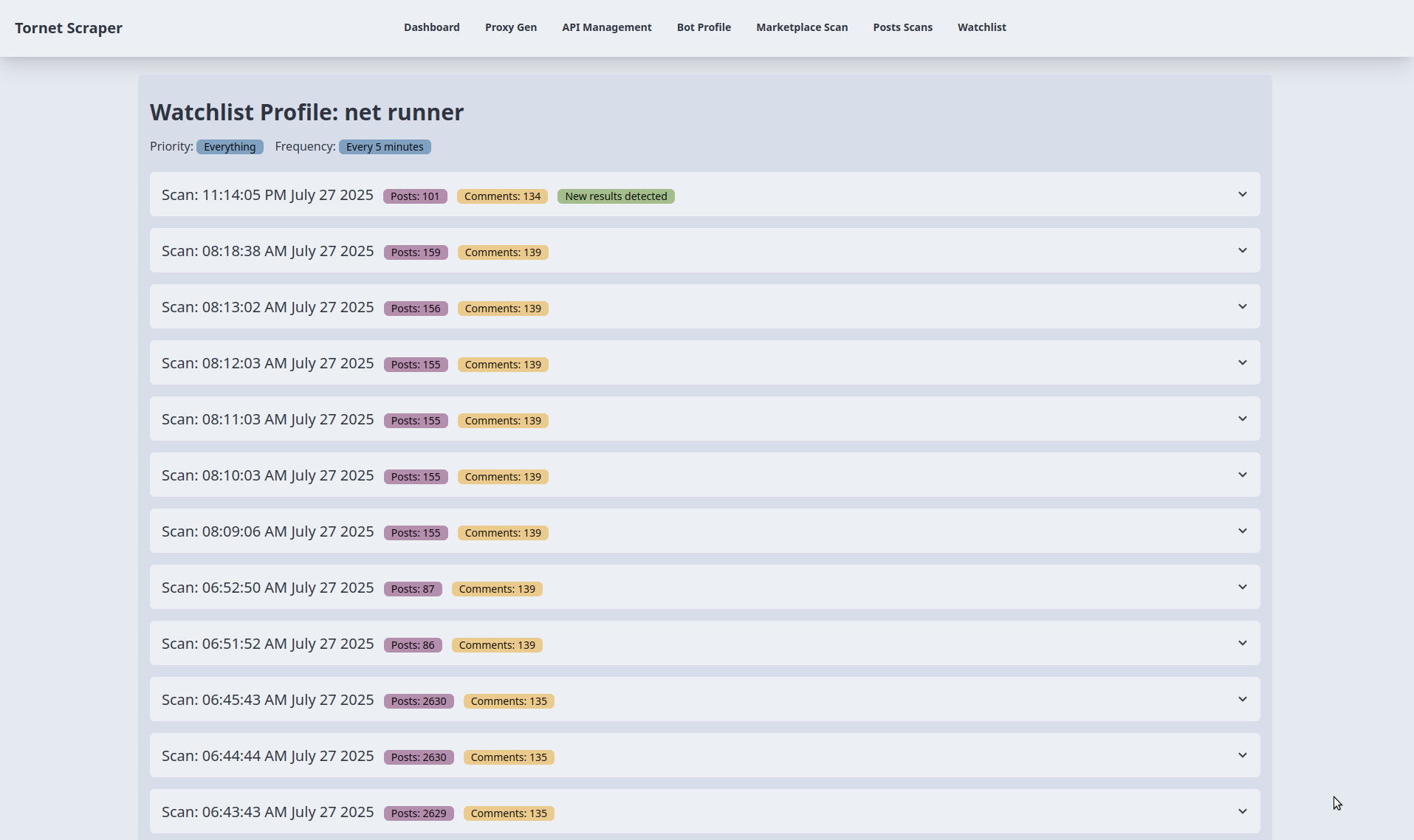
The following shows the results of monitoring. For testing, I adjusted the critical scheduling frequency from every 5 minutes to every 1 minute:
You can expand any accordion to view results and download them as JSON: