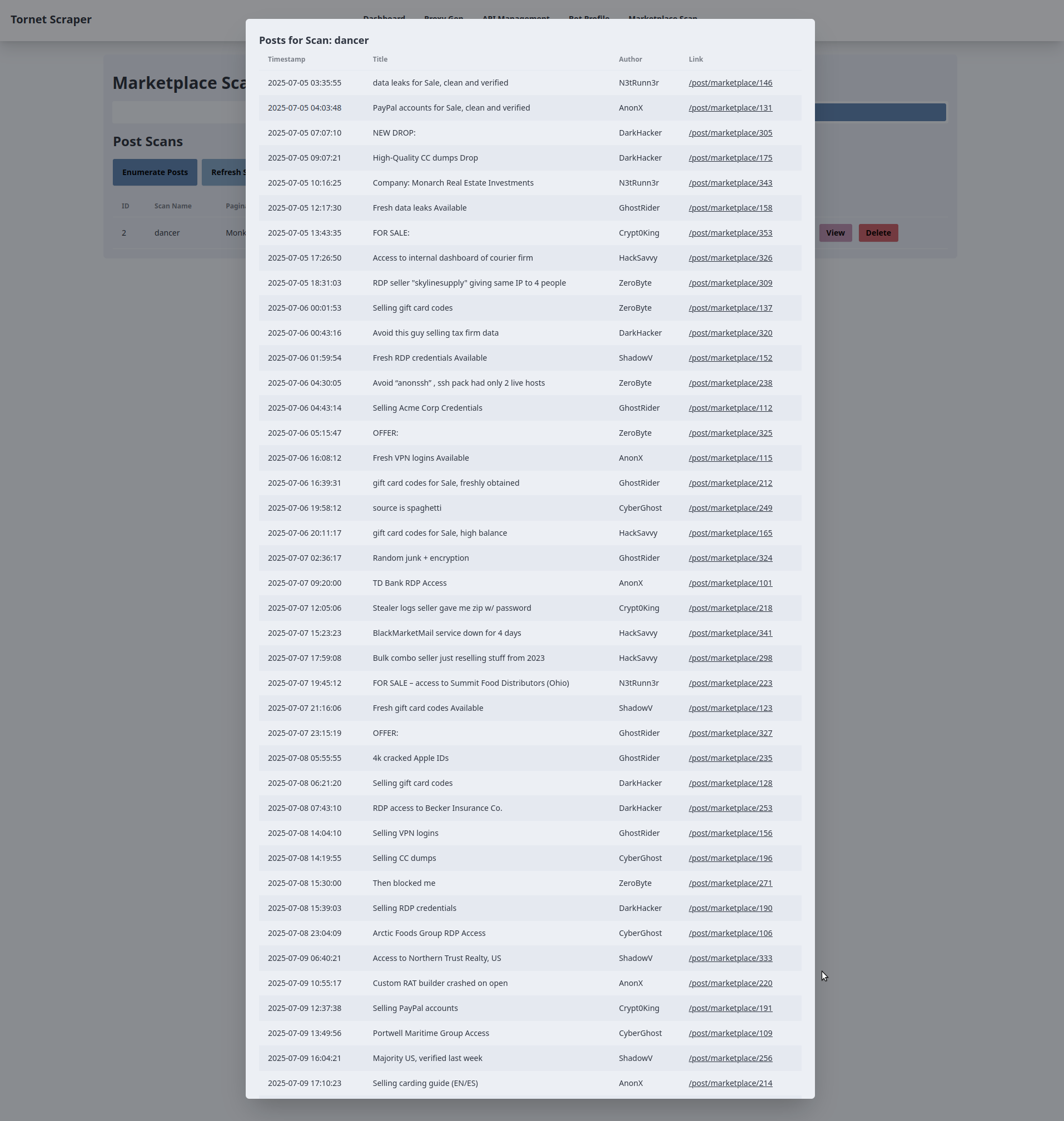
In this section, we will learn how to scrape posts from the sellers' marketplace and distribute the scraping tasks across multiple bots to run concurrently.
The goal is to divide tasks among bots because most forums impose rate limits on the number of requests you can send. In tornet_forum, there’s no rate limiting for navigating pagination, and you can move between pages without being logged in.
However, to prepare for various protection mechanisms, we’ll use bots with active sessions for scraping. While not required for tornet_forum, logged-in sessions may be necessary for other target sites you encounter. Having scraped data from such sites myself, I understand the challenges you might face, and this approach equips you for any scenario.
The topics of this section include the following:
- Database models
- Marketplace scraper modules
- Marketplace backend routes
- Marketplace frontend template
- Testing
Database models
Your models are located in app/database/models.py. You need 4 models to properly organize the date:
class MarketplacePaginationScan(Base):
    __tablename__ = "marketplace_pagination_scans"

    id = Column(Integer, primary_key=True, index=True)
    scan_name = Column(String, nullable=False)
    pagination_url = Column(String, nullable=False)
    max_page = Column(Integer, nullable=False)
    batches = Column(Text, nullable=True)
    timestamp = Column(DateTime, default=datetime.utcnow)


class ScanStatus(enum.Enum):
    RUNNING = "running"
    COMPLETED = "completed"
    STOPPED = "stopped"

class MarketplacePostScan(Base):
    __tablename__ = "marketplace_post_scans"

    id = Column(Integer, primary_key=True, index=True)
    scan_name = Column(String, nullable=False, unique=True)
    pagination_scan_name = Column(String, ForeignKey("marketplace_pagination_scans.scan_name"), nullable=False)
    start_date = Column(DateTime(timezone=True), default=datetime.utcnow)
    completion_date = Column(DateTime(timezone=True), nullable=True)
    status = Column(Enum(ScanStatus), default=ScanStatus.STOPPED, nullable=False)
    timestamp = Column(DateTime, default=datetime.utcnow)

class MarketplacePost(Base):
    __tablename__ = "marketplace_posts"

    id = Column(Integer, primary_key=True, index=True)
    scan_id = Column(Integer, ForeignKey("marketplace_post_scans.id"), nullable=False)
    timestamp = Column(String, nullable=False)
    title = Column(String, nullable=False)
    author = Column(String, nullable=False)
    link = Column(String, nullable=False)
    __table_args__ = (UniqueConstraint('scan_id', 'timestamp', name='uix_scan_timestamp'),)
For this functionality, we need multiple models to do all of the following:
-
MarketplacePaginationScan:- Purpose: Represents a pagination scan configuration for scraping a marketplace. It stores details about a scan that enumerates pages of a marketplace, such as the base URL and the maximum number of pages to scan.
- Key Fields:
id: Unique identifier for the scan.scan_name: Unique name for the pagination scan.pagination_url: The base URL used for pagination.max_page: The maximum number of pages to scan.batches: Stores serialized batch data (e.g., JSON) for processing pages.timestamp: Records when the scan was created.
-
ScanStatus (Enum):- Purpose: Defines the possible states of a post scan, used to track the status of a
MarketplacePostScan. - Values:
RUNNING: The scan is currently in progress.COMPLETED: The scan has finished successfully.STOPPED: The scan is not running (default or manually stopped).
- Purpose: Defines the possible states of a post scan, used to track the status of a
-
MarketplacePostScan:- Purpose: Represents a scan that collects posts from a marketplace, linked to a specific pagination scan. It tracks the scan’s metadata and status.
- Key Fields:
id: Unique identifier for the post scan.scan_name: Unique name for the post scan.pagination_scan_name: References the associatedMarketplacePaginationScanby itsscan_name.start_date: When the scan started.completion_date: When the scan completed (if applicable).status: Current state of the scan (fromScanStatusenum).timestamp: Records when the scan was created.
-
MarketplacePost:- Purpose: Stores individual posts collected during a
MarketplacePostScan. Each post is tied to a specific scan and includes details about the post. - Key Fields:
id: Unique identifier for the post.scan_id: References theMarketplacePostScanthis post belongs to.timestamp: Timestamp of the post (as a string).title: Title of the marketplace post.author: Author of the post.link: URL to the post.__table_args__: Ensures uniqueness of posts based onscan_idandtimestampto prevent duplicates.
- Purpose: Stores individual posts collected during a
Marketplace scraper modules
To see an example of how marketplace scraper works, open app/scrapers/marketplace_scraper.py.
import json
import requests
from bs4 import BeautifulSoup
import logging


# Set up logging
logging.basicConfig(level=logging.INFO, format='%(asctime)s - %(levelname)s - %(message)s')
logger = logging.getLogger(__name__)


def create_pagination_batches(url_template, max_page):
    """
    Given a web URL with max pagination number, this function returns batches of 10 pagination ranges.
    """
    if max_page < 1:
        return json.dumps({})
    all_urls = [url_template.format(page=page) for page in range(max_page, 0, -1)]
    batch_size = 10
    batches = {f"{i//batch_size + 1}": all_urls[i:i + batch_size] for i in range(0, len(all_urls), batch_size)}
    return json.dumps(batches)


def scrape_posts(session, proxy, useragent, pagination_range, timeout=30):
    """
    Given a list of web pages, it scraps all post details from every pagination page.
    """
    posts = {}
    headers = {'User-Agent': useragent}
    proxies = {'http': proxy, 'https': proxy} if proxy else None

    for url in pagination_range:
        logger.info(f"Scraping URL: {url}")
        try:
            response = session.get(url, headers=headers, proxies=proxies, timeout=timeout)
            logger.info(f"Response status code: {response.status_code}")
            response.raise_for_status()

            # Log response size and snippet
            logger.debug(f"Response size: {len(response.text)} bytes")
            logger.debug(f"Response snippet: {response.text[:200]}...")

            soup = BeautifulSoup(response.text, 'html.parser')
            table = soup.select_one('table.table-dark tbody')
            if not table:
                logger.error(f"No table found on {url}")
                continue

            table_rows = table.select('tr')
            logger.info(f"Found {len(table_rows)} table rows on {url}")

            for row in table_rows[:10]:
                try:
                    title = row.select_one('td:nth-child(1)').text.strip()
                    author = row.select_one('td:nth-child(2) a').text.strip()
                    timestamp = row.select_one('td:nth-child(3)').text.strip()
                    link = row.select_one('td:nth-child(5) a')['href']

                    logger.info(f"Extracted post: timestamp={timestamp}, title={title}, author={author}, link={link}")
                    posts[timestamp] = {
                        'title': title,
                        'author': author,
                        'link': link
                    }
                except AttributeError as e:
                    logger.error(f"Error parsing row on {url}: {e}")
                    continue

        except requests.RequestException as e:
            logger.error(f"Error scraping {url}: {e}")
            continue

    logger.info(f"Total posts scraped: {len(posts)}")
    return json.dumps(posts)


if __name__ == "__main__":
    # Create a proper requests.Session and set the cookie
    session = requests.Session()
    session.cookies.set('session', '.eJwlzsENwzAIAMBd_O4DbINNlokAg9Jv0ryq7t5KvQnuXfY84zrK9jrveJT9ucpWbA0xIs5aZ8VM5EnhwqNNbblWVlmzMUEH9MkDmwZQTwkFDlqhkgounTm9Q7U0nYQsw6MlmtKYqBgUpAMkuJpnuEMsYxtQfpH7ivO_wfL5AtYwMDs.aH1ifQ.uRrB1FnMt3U_apyiWitI9LDnrGE')

    proxy = "socks5h://127.0.0.1:49075"
    useragent = "Mozilla/5.0 (Windows NT 11.0; Win64; x64; rv:140.0) Gecko/20100101 Firefox/140.0"
    pagination_range = [
        "http://y5extjdmtegzt6n6qe3titrmgjvff4hiualgzy7n2jrahbmfkggbmqqd.onion/category/marketplace/Sellers?page=1",
        "http://y5extjdmtegzt6n6qe3titrmgjvff4hiualgzy7n2jrahbmfkggbmqqd.onion/category/marketplace/Sellers?page=2",
        "http://y5extjdmtegzt6n6qe3titrmgjvff4hiualgzy7n2jrahbmfkggbmqqd.onion/category/marketplace/Sellers?page=3"
    ]
    timeout = 30
    result = scrape_posts(session, proxy, useragent, pagination_range, timeout)
    print(result)
We need two individual functions to perform these tasks:
- create_pagination_batches(url_template, max_page)
- Generates batches of URLs for pagination by creating groups of 10 page URLs from a given URL template and maximum page number, returning them as a JSON string.
- scrape_posts(session, proxy, useragent, pagination_range, timeout)
- Scrapes post details (title, author, timestamp, link) from a list of webpage URLs using a requests session, proxy, and user agent, parsing HTML with
BeautifulSoup, and returns the collected data as a JSON string.
- Scrapes post details (title, author, timestamp, link) from a list of webpage URLs using a requests session, proxy, and user agent, parsing HTML with
We limit pagination batches to 10 pages because this is the threshold we’ve set. You can adjust this limit, but if your bots access 50 pagination pages in just a few seconds, it could trigger account lockouts.
Later, we will use the scrape_posts function to process ranges of pagination batches, enabling the scraping of posts from all batches.
Creating marketplace backend
The backend may seem more daunting than our previous tasks. You can find the backend code in app/routes/marketplace.py.
This complexity arises from concurrency, which allows us to distribute data scraping tasks across all available bots, increasing efficiency but adding intricacy. Note that all scans run in the background, so they continue even if you navigate between pages.
While the functionalities may appear complex, this is a natural part of the learning process. Our goal is to build an advanced web scraper for long-term data collection, a task that is inherently sophisticated.
get_pagination_scans
- Endpoint:
GET /api/marketplace-scan/list - Purpose: Retrieves all pagination scans from the database.
- Functionality:
- Queries the
MarketplacePaginationScantable to fetch all records. - Logs the number of scans fetched.
- Formats each scan into a JSON-compatible dictionary containing
id,scan_name,pagination_url,max_page,batches, andtimestamp. - Returns a
JSONResponsewith the list of scans and a 200 status code. - Handles exceptions by logging errors and raising an
HTTPExceptionwith a 500 status code if an error occurs.
- Queries the
enumerate_pages
- Endpoint:
POST /api/marketplace-scan/enumerate - Purpose: Creates a new pagination scan to enumerate pages for scraping.
- Functionality:
- Validates that the provided
scan_namedoes not already exist in the database. - Calls
create_pagination_batchesto generate batches of URLs based on the providedpagination_urlandmax_page. - Creates a new
MarketplacePaginationScanrecord with the scan details and stores the batches as JSON. - Commits the record to the database and logs the creation.
- Stores a success message in the session and returns a
JSONResponsewith a 201 status code. - Handles duplicate scan names (400), database errors (500, with rollback), and other exceptions by logging and raising appropriate
HTTPExceptions.
- Validates that the provided
delete_pagination_scan
- Endpoint:
DELETE /api/marketplace-scan/{scan_id} - Purpose: Deletes a pagination scan by its ID.
- Functionality:
- Queries the
MarketplacePaginationScantable for the scan with the specifiedscan_id. - If the scan is not found, logs a warning and raises a 404
HTTPException. - Deletes the scan from the database and commits the transaction.
- Logs the deletion and stores a success message in the session.
- Returns a
JSONResponsewith a 200 status code. - Handles errors by logging, rolling back the transaction, and raising a 500
HTTPException.
- Queries the
get_post_scans
- Endpoint:
GET /api/marketplace-scan/posts/list - Purpose: Retrieves all post scans from the database.
- Functionality:
- Queries the
MarketplacePostScantable to fetch all records. - Logs the number of scans fetched.
- Formats each scan into a JSON-compatible dictionary with
id,scan_name,pagination_scan_name,start_date,completion_date,status, andtimestamp. - Returns a
JSONResponsewith the list of scans and a 200 status code. - Handles exceptions by logging and raising a 500
HTTPException.
- Queries the
get_post_scan_status
- Endpoint:
GET /api/marketplace-scan/posts/{scan_id}/status - Purpose: Retrieves the status of a specific post scan by its ID.
- Functionality:
- Queries the
MarketplacePostScantable for the scan with the specifiedscan_id. - If the scan is not found, logs a warning and raises a 404
HTTPException. - Logs the status and returns a
JSONResponsewith the scan’sid,scan_name, andstatus(as a string value) with a 200 status code. - Handles exceptions by logging and raising a 500
HTTPException.
- Queries the
enumerate_posts
- Endpoint:
POST /api/marketplace-scan/posts/enumerate - Purpose: Creates a new post scan associated with a pagination scan.
- Functionality:
- Validates that the provided
scan_namedoes not already exist. - Checks if the referenced
pagination_scan_nameexists in theMarketplacePaginationScantable. - Ensures there are active bots with the
SCRAPE_MARKETPLACEpurpose and valid sessions. - Creates a new
MarketplacePostScanrecord with the providedscan_name,pagination_scan_name, and initial statusSTOPPED. - Commits the record to the database and logs the creation.
- Stores a success message in the session and returns a
JSONResponsewith a 201 status code. - Handles errors for duplicate scan names (400), missing pagination scans (404), no active bots (400), or other issues (500, with rollback).
- Validates that the provided
start_post_scan
- Endpoint:
POST /api/marketplace-scan/posts/{scan_id}/start - Purpose: Starts a post scan by processing batches of URLs using available bots.
- Functionality:
- Retrieves the
MarketplacePostScanbyscan_idand checks if it exists. - Ensures the scan is not already running (raises 400 if it is).
- Verifies the availability of bots with the
SCRAPE_MARKETPLACEpurpose. - Retrieves the associated
MarketplacePaginationScanand its batches. - Updates the scan status to
RUNNING, sets thestart_date, and clears thecompletion_date. - Runs an asynchronous
scrape_batchestask to process batches concurrently:- Assigns batches to available bots using a
ThreadPoolExecutor. - Each bot scrapes a batch of URLs using the
scrape_postsfunction, with session cookies and Tor proxy. - Handles JSON parsing errors by sanitizing data (normalizing Unicode, removing control characters).
- Saves unique posts to the
MarketplacePosttable, avoiding duplicates. - Logs progress and errors for each batch.
- Marks the scan as
COMPLETEDupon success orSTOPPEDon failure.
- Assigns batches to available bots using a
- Stores a success message in the session and returns a
JSONResponsewith a 200 status code. - Handles errors for missing scans (404), running scans (400), no bots (400), missing batches (400), or other issues (500, with rollback).
- Retrieves the
delete_post_scan
- Endpoint:
DELETE /api/marketplace-scan/posts/{scan_id} - Purpose: Deletes a post scan by its ID.
- Functionality:
- Queries the
MarketplacePostScantable for the scan with the specifiedscan_id. - If the scan is not found, logs a warning and raises a 404
HTTPException. - Deletes the scan from the database and commits the transaction.
- Logs the deletion and stores a success message in the session.
- Returns a
JSONResponsewith a 200 status code. - Handles errors by logging, rolling back the transaction, and raising a 500
HTTPException.
- Queries the
get_scan_posts
- Endpoint:
GET /api/marketplace-scan/posts/{scan_id}/posts - Purpose: Retrieves all posts associated with a specific post scan.
- Functionality:
- Queries the
MarketplacePostScantable to verify the scan exists. - If the scan is not found, logs a warning and raises a 404
HTTPException. - Queries the
MarketplacePosttable for all posts linked to thescan_id. - Logs the number of posts fetched.
- Formats each post into a JSON-compatible dictionary with
id,timestamp,title,author, andlink. - Returns a
JSONResponsewith the list of posts and a 200 status code. - Handles exceptions by logging and raising a 500
HTTPException.
- Queries the
This functionality requires manual initiation of scraping every few hours to check for new forum activity. Automating this process is avoided to conserve resources, as continuous scraping would often collect duplicate data, leading to inefficient resource consumption. Therefore, running marketplace scans non-stop is not the optimal approach.
From my extensive experience, implementing continuous scans every few hours is generally inadvisable due to the significant resource demands.
In Module 5, we will implement continuous data scraping, but as you’ll discover, this process often generates duplicate data.
Marketplace frontend template
For the marketplace, we need a template with two tabs, which allow us to switch between multiple containers within a single page. Instead of creating two separate routes, we’ll use one route with tabs to streamline the design.
While tabs can sometimes complicate a web application, in this case, they simplify it by avoiding the need for two separate templates, which would increase app bloat. As you progress, we’ll explore multiple templates, but for this specific functionality, tabs are sufficient.
The template is located at app/templates/marketplace.html.
-
Tab Navigation for Pagination and Post Scans:
- Purpose: Organizes the interface into "Marketplace Pagination" and "Marketplace Posts" tabs.
- Backend Interaction: The
openTab()function toggles visibility of tab content (paginationorposts) without direct backend calls. Initial data for both tabs (pagination_scansandpost_scans) is provided bymain.py::marketplaceand rendered using Jinja2.
-
Pagination Scan Enumeration:
- Purpose: Initiates a new pagination scan to enumerate marketplace pages.
- Backend Interaction:
- The "Enumerate Pages" button opens a modal (
enumerate-modal) with fields for scan name, pagination URL, and max page number. - Form submission sends an AJAX POST request to
/api/marketplace-scan/enumerate(handled bymarketplace_api_router) with the form data. - The backend creates a
MarketplacePaginationScanrecord, processes the pagination, and stores results. On success, the page reloads to display the updated scan list. Errors trigger an alert with the error message.
- The "Enumerate Pages" button opens a modal (
-
Post Scan Enumeration:
- Purpose: Creates a new post scan based on an existing pagination scan.
- Backend Interaction:
- The "Enumerate Posts" button opens a modal (
enumerate-posts-modal) with fields for scan name and a dropdown of existing pagination scans (populated frompagination_scans). - Form submission sends an AJAX POST request to
/api/marketplace-scan/posts/enumerate(handled bymarketplace_api_router) with the scan name and selected pagination scan. - The backend creates a
MarketplacePostScanrecord linked to the chosen pagination scan. On success, the page reloads to update the post scans table. Errors trigger an alert.
- The "Enumerate Posts" button opens a modal (
-
Post Scan Management:
- Purpose: Starts, views, or deletes post scans.
- Backend Interaction:
- Start: Each post scan row (non-running) has a "Start" button that sends an AJAX POST request to
/api/marketplace-scan/posts/{scanId}/start(handled bymarketplace_api_router) to initiate the scan. On success,refreshScans()updates the table. - View: A "View" button opens a modal (
view-posts-modal-{scanId}) that fetches post data via an AJAX GET request to/api/marketplace-scan/posts/{scanId}/posts, populating a table with post details (timestamp, title, author, link). Errors trigger an alert. - Delete: A "Delete" button prompts for confirmation and sends an AJAX DELETE request to
/api/marketplace-scan/posts/{scanId}to remove the scan from theMarketplacePostScantable. On success, the page reloads. Errors trigger an alert.
- Start: Each post scan row (non-running) has a "Start" button that sends an AJAX POST request to
-
Pagination Scan Viewing and Deletion:
- Purpose: Displays details of pagination scans and allows deletion.
- Backend Interaction:
- View: Each pagination scan row has a "View" button that opens a modal (
view-modal-{scanId}) with read-only fields for scan name, URL, max page, and batches (JSON-formatted). Data is preloaded frompagination_scansvia Jinja2, requiring no additional backend call. - Delete: A "Delete" button (
deleteScan()) prompts for confirmation and sends an AJAX DELETE request to/api/marketplace-scan/{scanId}to remove the scan from theMarketplacePaginationScantable. On success, the page reloads. Errors trigger an alert.
- View: Each pagination scan row has a "View" button that opens a modal (
-
Post Scan Table Refresh:
- Purpose: Updates the post scans table to reflect current statuses.
- Backend Interaction:
- The "Refresh Scans" button triggers
refreshScans(), sending an AJAX GET request to/api/marketplace-scan/posts/list(handled bymarketplace_api_router). - The backend returns a list of
MarketplacePostScanrecords (ID, scan name, pagination scan name, start/completion dates, status). The table is updated with status badges (e.g., Completed, Running, Stopped). Errors trigger an alert.
- The "Refresh Scans" button triggers
Testing
To start testing, you’ll need to configure the following components:
- Add and activate a CAPTCHA API from the
/manage-apiendpoint. - Create at least two bot profiles and perform login to retrieve their sessions from the
/bot-profileendpoint. - Obtain the marketplace pagination URL from
tornet_forum, for example:http://site.onion/category/marketplace/Sellers?page=1. - Navigate to
/marketplace-scan, select theMarketplace Paginationtab, clickEnumerate Pages, and fill in the fields as follows:- Scan Name:
Monkey - Pagination URL:
http://site.onion/category/marketplace/Sellers?page={page} - Max Pagination Number: 14 (adjust based on the total number of pagination pages available).
- Scan Name:
Once the scan completes, click to view the results, and a modal will display. Below is an example of how pagination batches may appear in JSON format:
"{\"1\": [\"http://z3zpjsqox4dzxkrk7o34e43cpnc5yrdkywumspqt2d5h3eibllcmswad.onion/category/marketplace/Sellers?page=14\", \"http://z3zpjsqox4dzxkrk7o34e43cpnc5yrdkywumspqt2d5h3eibllcmswad.onion/category/marketplace/Sellers?page=13\", \"http://z3zpjsqox4dzxkrk7o34e43cpnc5yrdkywumspqt2d5h3eibllcmswad.onion/category/marketplace/Sellers?page=12\", \"http://z3zpjsqox4dzxkrk7o34e43cpnc5yrdkywumspqt2d5h3eibllcmswad.onion/category/marketplace/Sellers?page=11\", \"http://z3zpjsqox4dzxkrk7o34e43cpnc5yrdkywumspqt2d5h3eibllcmswad.onion/category/marketplace/Sellers?page=10\", \"http://z3zpjsqox4dzxkrk7o34e43cpnc5yrdkywumspqt2d5h3eibllcmswad.onion/category/marketplace/Sellers?page=9\", \"http://z3zpjsqox4dzxkrk7o34e43cpnc5yrdkywumspqt2d5h3eibllcmswad.onion/category/marketplace/Sellers?page=8\", \"http://z3zpjsqox4dzxkrk7o34e43cpnc5yrdkywumspqt2d5h3eibllcmswad.onion/category/marketplace/Sellers?page=7\", \"http://z3zpjsqox4dzxkrk7o34e43cpnc5yrdkywumspqt2d5h3eibllcmswad.onion/category/marketplace/Sellers?page=6\", \"http://z3zpjsqox4dzxkrk7o34e43cpnc5yrdkywumspqt2d5h3eibllcmswad.onion/category/marketplace/Sellers?page=5\"], \"2\": [\"http://z3zpjsqox4dzxkrk7o34e43cpnc5yrdkywumspqt2d5h3eibllcmswad.onion/category/marketplace/Sellers?page=4\", \"http://z3zpjsqox4dzxkrk7o34e43cpnc5yrdkywumspqt2d5h3eibllcmswad.onion/category/marketplace/Sellers?page=3\", \"http://z3zpjsqox4dzxkrk7o34e43cpnc5yrdkywumspqt2d5h3eibllcmswad.onion/category/marketplace/Sellers?page=2\", \"http://z3zpjsqox4dzxkrk7o34e43cpnc5yrdkywumspqt2d5h3eibllcmswad.onion/category/marketplace/Sellers?page=1\"]}"
To enumerate posts in the marketplace, follow these steps:
- Navigate to
/marketplace-scanand select theMarketplace Poststab. - Click
Enumerate Posts, enter a scan name, select the pagination scan namedMonkey, and clickStart Scan. This prepares the scan but does not initiate it. - Return to
/marketplace-scan, go to theMarketplace Poststab, locate your scan, and click theStartbutton to begin the scan.
Below is an example of the output from my setup:
2025-07-21 19:49:41,140 - INFO - Found 3 active bots for scan ID 6: ['DarkHacker', 'CyberGhost', 'ShadowV']
2025-07-21 19:49:41,141 - INFO - Starting post scan tyron (ID: 6) with 2 batches: ['1', '2']
2025-07-21 19:49:41,148 - INFO - Post scan tyron (ID: 6) status updated to RUNNING
2025-07-21 19:49:41,149 - INFO - Assigning batch 1 to bot DarkHacker (ID: 1)
2025-07-21 19:49:41,150 - INFO - Bot DarkHacker (ID: 1) starting batch 1 (10 URLs)
2025-07-21 19:49:41,150 - INFO - Scraping URL: http://z3zpjsqox4dzxkrk7o34e43cpnc5yrdkywumspqt2d5h3eibllcmswad.onion/category/marketplace/Sellers?page=20
2025-07-21 19:49:41,151 - INFO - Assigning batch 2 to bot CyberGhost (ID: 2)
2025-07-21 19:49:41,151 - INFO - Bot CyberGhost (ID: 2) starting batch 2 (10 URLs)
2025-07-21 19:49:41,151 - INFO - Scraping URL: http://z3zpjsqox4dzxkrk7o34e43cpnc5yrdkywumspqt2d5h3eibllcmswad.onion/category/marketplace/Sellers?page=10
2025-07-21 19:49:41,152 - INFO - Launching 2 concurrent batch tasks
INFO:     127.0.0.1:34646 - "POST /api/marketplace-scan/posts/6/start HTTP/1.1" 200 OK
2025-07-21 19:49:41,158 - INFO - Fetched 6 post scans
INFO:     127.0.0.1:34646 - "GET /api/marketplace-scan/posts/list HTTP/1.1" 200 OK
INFO:     127.0.0.1:34646 - "GET /manage-api HTTP/1.1" 200 OK
INFO:     127.0.0.1:34646 - "GET /api/manage-api/list HTTP/1.1" 200 OK
INFO:     127.0.0.1:34646 - "GET /proxy-gen HTTP/1.1" 200 OK
INFO:     127.0.0.1:34646 - "GET /api/proxy-gen/list HTTP/1.1" 200 OK
2025-07-21 19:49:46,794 - INFO - Response status code: 200
2025-07-21 19:49:46,804 - INFO - Found 10 table rows on http://z3zpjsqox4dzxkrk7o34e43cpnc5yrdkywumspqt2d5h3eibllcmswad.onion/category/marketplace/Sellers?page=20
2025-07-21 19:49:46,804 - INFO - Extracted post: timestamp=2025-07-19 07:04:10, title=OFFER:, author=DarkHacker, link=/post/marketplace/1901
2025-07-21 19:49:46,805 - INFO - Extracted post: timestamp=2025-07-19 06:33:54, title=Avoid “anonssh” , ssh pack had only 2 live hosts, author=N3tRunn3r, link=/post/marketplace/588
2025-07-21 19:49:46,805 - INFO - Extracted post: timestamp=2025-07-19 05:56:53, title=Access to Northern Trust Realty, US, author=DarkHacker, link=/post/marketplace/1532
2025-07-21 19:49:46,806 - INFO - Extracted post: timestamp=2025-07-19 05:20:53, title=FOR SALE:, author=GhostRider, link=/post/marketplace/2309
2025-07-21 19:49:46,806 - INFO - Extracted post: timestamp=2025-07-19 04:24:04, title=Custom RAT builder crashed on open, author=ShadowV, link=/post/marketplace/968
2025-07-21 19:49:46,806 - INFO - Extracted post: timestamp=2025-07-19 03:35:29, title=Private obfuscator for Python tools, author=GhostRider, link=/post/marketplace/1845
2025-07-21 19:49:46,806 - INFO - Extracted post: timestamp=2025-07-19 03:23:21, title="RootedShells" panel has backconnect, author=ZeroByte, link=/post/marketplace/1829
2025-07-21 19:49:46,806 - INFO - Extracted post: timestamp=2025-07-19 03:09:27, title=RDP seller "skylinesupply" giving same IP to 4 people, author=N3tRunn3r, link=/post/marketplace/1710
2025-07-21 19:49:46,807 - INFO - Extracted post: timestamp=2025-07-19 02:39:40, title=FOR SALE: DA access into Lakewood Public Services, author=ShadowV, link=/post/marketplace/972
2025-07-21 19:49:46,807 - INFO - Extracted post: timestamp=2025-07-19 02:37:10, title=4k cracked Apple IDs, author=DarkHacker, link=/post/marketplace/1154
2025-07-21 19:49:46,807 - INFO - Scraping URL: http://z3zpjsqox4dzxkrk7o34e43cpnc5yrdkywumspqt2d5h3eibllcmswad.onion/category/marketplace/Sellers?page=19
2025-07-21 19:49:46,995 - INFO - Response status code: 200
--- snip ---
--- snip ---
--- snip ---
2025-07-21 19:49:56,643 - INFO - Total posts scraped: 100
2025-07-21 19:49:56,643 - INFO - Bot CyberGhost completed batch 2, found 100 posts
2025-07-21 19:49:56,696 - INFO - Bot DarkHacker saved batch 1 posts to database for scan ID 6
2025-07-21 19:49:56,704 - INFO - Bot CyberGhost saved batch 2 posts to database for scan ID 6
2025-07-21 19:49:56,710 - INFO - Post scan tyron (ID: 6) completed successfully
Once the scan starts, observe that you can switch between pages, and the scan will continue running in the background:
2025-07-21 19:49:41,152 - INFO - Launching 2 concurrent batch tasks
INFO:     127.0.0.1:34646 - "POST /api/marketplace-scan/posts/6/start HTTP/1.1" 200 OK
2025-07-21 19:49:41,158 - INFO - Fetched 6 post scans
INFO:     127.0.0.1:34646 - "GET /api/marketplace-scan/posts/list HTTP/1.1" 200 OK
INFO:     127.0.0.1:34646 - "GET /manage-api HTTP/1.1" 200 OK
INFO:     127.0.0.1:34646 - "GET /api/manage-api/list HTTP/1.1" 200 OK
INFO:     127.0.0.1:34646 - "GET /proxy-gen HTTP/1.1" 200 OK
INFO:     127.0.0.1:34646 - "GET /api/proxy-gen/list HTTP/1.1" 200 OK
2025-07-21 19:49:46,794 - INFO - Response status code: 200
2025-07-21 19:49:46,804 - INFO - Found 10 table rows on
Scans will not resume after a system restart or if you quit the application.
Here is how the result of a scan could look like on your end: