In this section I will explain how we can perform large-scale post scraping against collected posts. The ground work has been already done for us, post details are scraped but their content isn't so in the final phase, we scrape the content and perform translation if required.
This is the most interest phase because we are coming to the end of course, identifying IAB sales was our initial, it's what you are here for anyway but this section might be the most complicated one of every other section at least in the first glance.
It's complex because we are building a solution for large scale data scanning, that's obviously going to be complicated with lots of moving parts, it's just the reality of large-scale threat monitoring.
The topics of this section include the following:
- Data scraper components
- Database models
- Templates for Managing and Displaying Scans
- Template for displaying result of every scan
- Backend routes
- Testing
Data scraper components
Our data scraper comprises several components, including modules designed for tasks like scraping post details, translating content when needed, and classifying data.
The main components are located at app/scrapers/post_scraper.py.
-
scrape_post_details:- Purpose: Scrapes details (title, timestamp, author, content) from a specified post URL using web scraping techniques.
- Key Parameters:
post_link: URL of the post to scrape.session_cookie: Authentication cookie for accessing the post.tor_proxy: Optional proxy address for Tor routing.user_agent: User agent string for request headers.timeout: Request timeout duration (default: 30 seconds).
- Returns: JSON string containing extracted post details or error information if the request fails.
-
translate_string:- Purpose: Detects the language of an input string and translates it to English (or specified target language) using the DeepL API if not already in English.
- Key Parameters:
input_string: Text to analyze and potentially translate.auth_key: DeepL API authentication key.target_lang: Target language for translation (default: EN-US).
- Returns: JSON string with original text, detected language, and translated text (if applicable) or error details.
-
iab_classify:- Purpose: Classifies a post using Anthropic's Claude model to determine if it discusses selling initial access, unrelated items, or warnings/complaints.
- Key Parameters:
api_key: Anthropic API key for authentication.model_name: Name of the Claude model to use (e.g., 'claude-3-5-sonnet-20241022').prompt: Text prompt containing the post to classify.max_tokens: Maximum number of output tokens (default: 100).
- Returns: JSON string with classification result, scores, or error information if classification fails.
scrape_post_details function
The Tornet forum requires a logged-in session to read posts, which is typical behavior for most forums. To address this, I developed a function that takes a post link and retrieves its data.
This approach is logical because the marketplace_posts table stores all post details and links. By loading this data, we can pass each post link to a function like scrape_post_details to extract the required information.
translate_string function
In the translate_string function, we utilize DeepL for data translation. However, in app/routes/posts.py, we first employ the langdetect library to identify the language of a post. If the language detection fails or the detected language is not English, we pass the post to the translate_string function.
A key advantage is that if you provide a string containing newlines:
Venta de acceso a Horizon Logistics\nIngresos: 1200 millones de dólares\nAcceso: RDP con DA\nPrecio: 0,8 BTC\nDM para más detalles
The function preserves them in the translated output:
Sale of access to Horizon Logistics\nRevenue: $1.2 billion\nAccess: RDP with DA\nPrice: 0.8 BTC\nDM for more details
iab_classify function
In iab_classify, our temperature is set to a default of 0.1, you could change this if you wanted.
In AI or LLM interactions, temperature is a hyperparameter that controls the randomness or creativity of the model's output:
- Purpose: Adjusts the probability distribution over the model's possible outputs (e.g., words or tokens) during generation.
- How it Works:
- Low temperature (e.g., 0.1): Makes the model more deterministic, favoring high-probability outputs. Results in more focused, predictable, and conservative responses.
- High temperature (e.g., 1.0 or higher): Increases randomness, giving lower-probability outputs a higher chance. Leads to more creative, diverse, or unexpected responses.
- Example in Code: In the provided
iab_classifyfunction,temperature=0.1is used to make the Claude model's classification output more consistent and less random. - Range: Typically between 0 and 1, though some models allow higher values for extreme randomness.
Database models
For scraping posts, posts batch size, and storing data, we need two table. Here is what your models look like:
class PostDetailScan(Base):
    __tablename__ = "post_detail_scans"

    id = Column(Integer, primary_key=True, index=True)
    scan_name = Column(String, nullable=False, unique=True)
    source_scan_name = Column(String, ForeignKey("marketplace_post_scans.scan_name"), nullable=False)
    start_date = Column(DateTime(timezone=True), default=datetime.utcnow)
    completion_date = Column(DateTime(timezone=True), nullable=True)
    status = Column(Enum(ScanStatus), default=ScanStatus.STOPPED, nullable=False)
    batch_size = Column(Integer, nullable=False)
    site_url = Column(String, nullable=False)
    timestamp = Column(DateTime(timezone=True), default=datetime.utcnow)


class MarketplacePostDetails(Base):
    __tablename__ = "marketplace_post_details"

    id = Column(Integer, primary_key=True, index=True)
    scan_id = Column(Integer, ForeignKey("post_detail_scans.id"), nullable=False)
    batch_name = Column(String, nullable=False)
    title = Column(String, nullable=False)
    content = Column(Text, nullable=False)
    timestamp = Column(String, nullable=False)
    author = Column(String, nullable=False)
    link = Column(String, nullable=False)
    original_language = Column(String, nullable=True)
    original_text = Column(Text, nullable=True)
    translated_language = Column(String, nullable=True)
    translated_text = Column(Text, nullable=True)
    is_translated = Column(Boolean, default=False)
    sentiment = Column(String, nullable=True)
    positive_score = Column(Float, nullable=True)
    negative_score = Column(Float, nullable=True)
    neutral_score = Column(Float, nullable=True)
    timestamp_added = Column(DateTime(timezone=True), default=datetime.utcnow)
    __table_args__ = (UniqueConstraint('scan_id', 'timestamp', 'batch_name', name='uix_scan_timestamp_batch'),)
post_detail_scans
The post_detail_scans table is used to create scans that retrieve data from the marketplace_post_scans table. It also stores the batch size, as many sites impose rate limits, such as restrictions on the number of posts you can read within 24 hours. To manage this, we divide posts into batches of 10 or 20 and assign these batches to bots configured with the scrape_post purpose.
The marketplace_post_scans table stores post metadata, including title, link, timestamp, and author, but excludes detailed content.
marketplace_post_details
This table stores the results of each scan. We initiate scans in post_detail_scans, load them into the scraper, and begin collecting data. Once collected, the data is saved to the marketplace_post_details table.
We track comprehensive details, including original text, original language, translated text, sentiment, confidence scores, author, timestamp, and more.
Templates for Managing and Displaying Scans
We require two templates: one for managing scans and another for displaying the results of each scan. The template for managing scans is posts_scans.html. Here’s a preview of its interface:
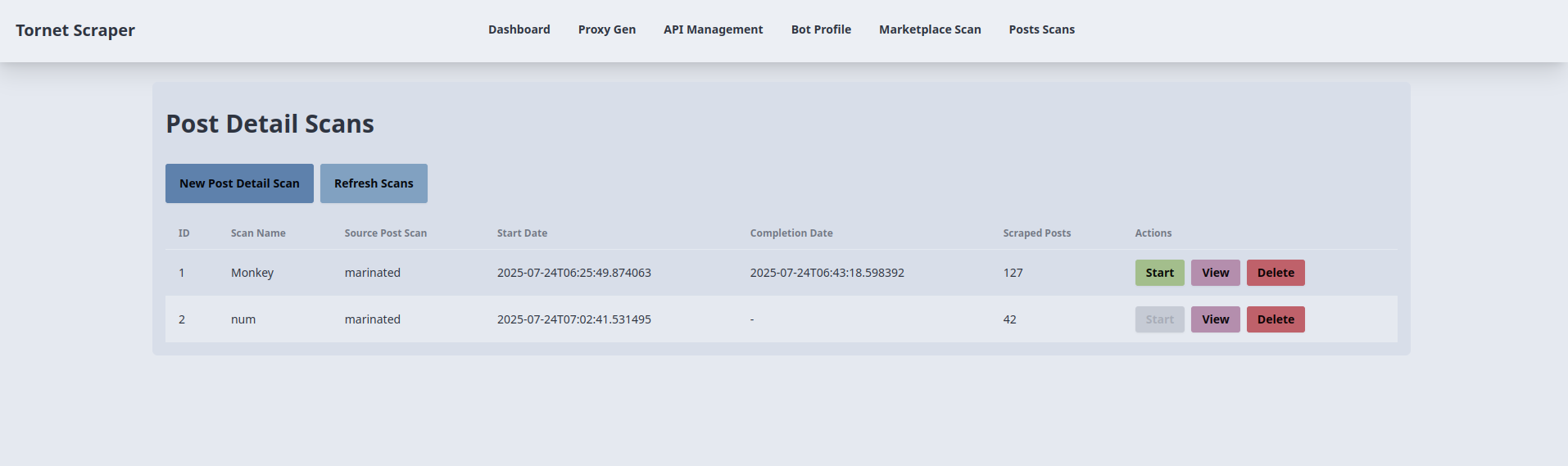
The corresponding code is located in app/templates/posts_scans.html.
-
Post Detail Scan Creation and Start:
- Purpose: Creates and initiates a new post detail scan.
- Backend Interaction:
- The "New Post Detail Scan" button opens a modal (
newScanModal) with fields for scan name, source post scan (dropdown of completed scans), batch size, and site URL. - Form submission triggers an AJAX POST request to
/api/posts-scanner/create(handled byposts_api_router) with form data, followed by a POST to/api/posts-scanner/{id}/startto initiate the scan. - The backend creates a
PostDetailScanrecord, links it to aMarketplacePostScan, and starts scraping. Form data is stored insessionStoragefor reuse instartScan(). On success, a success alert is shown, the modal closes, andrefreshScans()updates the table. Errors trigger an alert with the error message.
- The "New Post Detail Scan" button opens a modal (
-
Post Detail Scan Listing and Refresh:
- Purpose: Displays and updates a table of post detail scans.
- Backend Interaction:
- The
refreshScans()function, called on page load and by the "Refresh Scans" button, sends an AJAX GET request to/api/posts-scanner/list(handled byposts_api_router). - The backend returns a list of
PostDetailScanrecords (ID, scan name, source scan name, start/completion dates, scraped posts, status). The table is populated with status badges (e.g.,badge-successfor completed). If no scans exist, a "No scans available" message is shown. Errors trigger an alert.
- The
-
Starting a Post Detail Scan:
- Purpose: Initiates an existing post detail scan.
- Backend Interaction:
- Each table row’s "Start" button (disabled for running scans) calls
startScan(scanId), sending an AJAX POST request to/api/posts-scanner/{scanId}/start(handled byposts_api_router) withbatch_sizeandsite_urlfromsessionStorage. - The backend starts the scan, updating the
PostDetailScanstatus. On success, a success alert is shown, andrefreshScans()updates the table. Errors trigger an alert.
- Each table row’s "Start" button (disabled for running scans) calls
-
Viewing Scan Results:
- Purpose: Redirects to a results page for a specific scan.
- Backend Interaction:
- Each table row’s "View" button calls
viewResults(scanId, scanName), redirecting to/posts-scan-result/{scanId}?name={scanName}(handled bymain.py::posts_scan_result). - The backend renders a template with scan details, fetching associated
MarketplacePostDetailsrecords. No direct AJAX call occurs here, but the redirect relies on backend data.
- Each table row’s "View" button calls
-
Deleting a Post Detail Scan:
- Purpose: Deletes a post detail scan.
- Backend Interaction:
- Each table row’s "Delete" button calls
deleteScan(scanId)after user confirmation, sending an AJAX DELETE request to/api/posts-scanner/{scanId}(handled byposts_api_router). - The backend removes the
PostDetailScanrecord. On success, a success alert is shown, andrefreshScans()updates the table. Errors trigger an alert.
- Each table row’s "Delete" button calls
-
Source Post Scan Dropdown Population:
- Purpose: Populates the source scan dropdown with completed post scans.
- Backend Interaction:
- On page load, an AJAX GET request to
/api/posts-scanner/completed-post-scans(handled byposts_api_router) fetches a list of completedMarketplacePostScannames. - The backend returns scan names, which are added as options to the dropdown in the new scan modal. Errors are logged to the console.
- On page load, an AJAX GET request to
Template for displaying result of every scan
When displaying result for every marketplace scan, we used modals to display them. But here because there is lots of information, search and filtering involved, we need a different template just to show results.
Here is how I am using search and sentiment classification to filter positive results that discuss IAB and have the keyword "shell" in title:
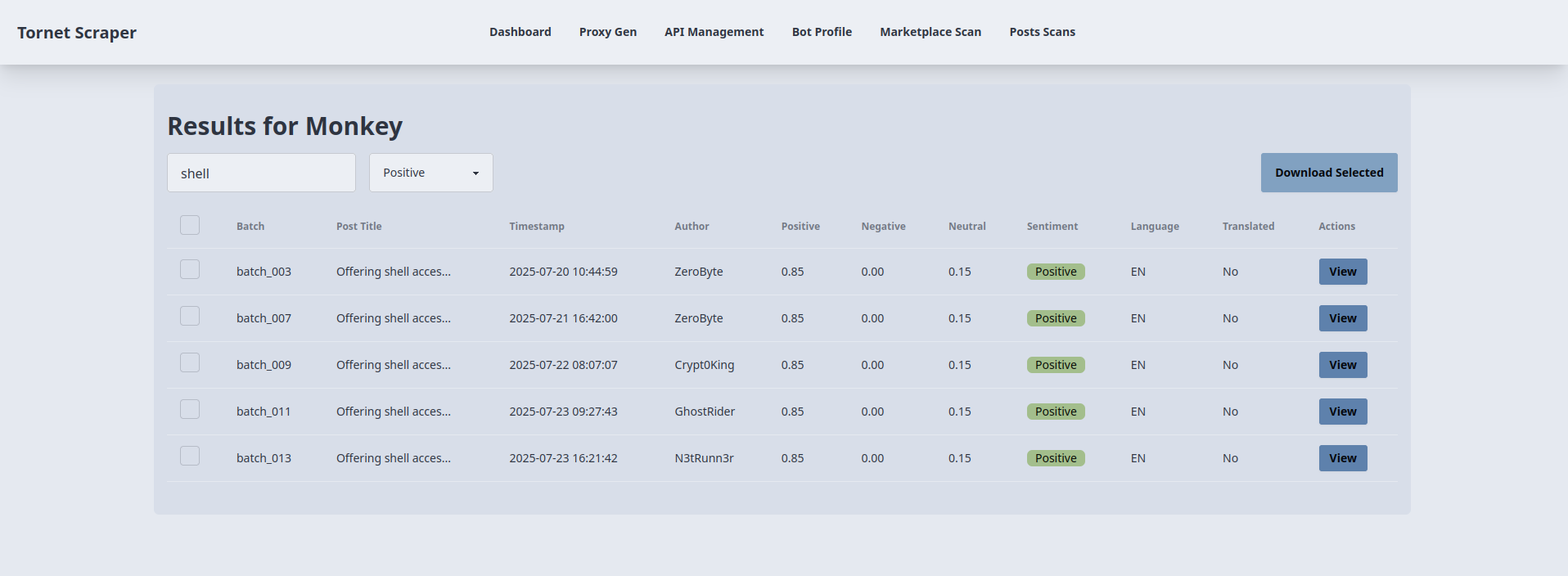
As an analyst, something like this is extremely useful for you because you can filter results, view only the things you find critical in your investigation and download them as JSON.
The template used for displaying result of every scan is at: app/templates/posts_scan_result.html.
-
Loading Scan Results:
- Purpose: Displays results for a specific post detail scan in a table.
- Backend Interaction:
- On page load, the
loadResults()function extracts thescanIdfrom the URL and sends an AJAX GET request to/api/posts-scanner/{scanId}/results(handled byposts_api_router). - The backend queries the
MarketplacePostDetailstable for the scan’s results (ID, title, timestamp, author, batch name, sentiment scores, language, translated text) and returns them as JSON. - The table is populated with rows, each showing a checkbox, batch name, truncated title, timestamp, author, sentiment scores (positive, negative, neutral), dominant sentiment (calculated client-side as the highest score), language, and translation status. Errors trigger an alert.
- On page load, the
-
Search and Sentiment Filtering:
- Purpose: Filters the results table by post title and sentiment.
- Backend Interaction:
- The
filterTable()function, triggered by keyup on#searchInputand change on#sentimentFilter, filters table rows client-side based on the search term (title) and selected sentiment (all,positive,negative,neutral). - No direct backend calls are made; filtering uses the
data-sentimentattribute set duringloadResults(). Rows are shown or hidden based on matches, ensuring dynamic updates without additional requests.
- The
-
Viewing Post Details:
- Purpose: Displays detailed information for a selected post in a modal.
- Backend Interaction:
- Each table row’s "View" button populates the
viewModalwith data stored in the button’sdata-*attributes (title, timestamp, author, batch, sentiment scores, sentiment, language, translation status, link, original/translated content) from the initialloadResults()response. - No additional backend call is required; the modal displays readonly fields and textareas. The "Close" button hides the modal without backend interaction.
- Each table row’s "View" button populates the
-
Downloading Selected Results:
- Purpose: Exports selected post results as a JSON file.
- Backend Interaction:
- The "Download Selected" button (
#downloadSelected) collects IDs of checked rows (filtered by visibility) and sends an AJAX POST request to/api/posts-scanner/{scanId}/download(handled byposts_api_router) with thepost_idsarray. - The backend retrieves the corresponding
MarketplacePostDetailsrecords and returns them as JSON. The client creates a downloadable JSON file (scan_{scanId}_results.json) using aBlob. If no rows are selected or an error occurs, an alert is shown.
- The "Download Selected" button (
Backend routes
The backend code is located at app/routes/posts.py, the following is an explanation of key functions.
get_post_scans:
- Purpose: Retrieves all post detail scans from the database, including details like scan ID, name, source scan name, start/completion dates, status, and the count of scraped posts.
- Key Features:
- Queries
PostDetailScanand joins withMarketplacePostDetailsto count scraped posts. - Returns a JSON response with scan details.
- Handles errors with a 500 status code if the query fails.
- Queries
get_completed_post_scans:
- Purpose: Fetches the names of completed
MarketplacePostScanscans for use in a dropdown menu. - Key Features:
- Filters for scans with a
COMPLETEDstatus and a non-null completion date. - Returns a JSON list of scan names.
- Raises a 500 error if the query fails.
- Filters for scans with a
create_post_scan:
- Purpose: Creates a new post detail scan based on a provided configuration.
- Key Features:
- Validates that the scan name is unique and the source scan is completed.
- Creates a
PostDetailScanrecord withSTOPPEDstatus and stores batch size and site URL. - Returns a JSON response with the scan ID and a success message.
- Handles duplicate scan names (400) or missing source scans (404).
start_post_scan:
- Purpose: Initiates a post detail scan by processing posts from a source scan in batches using multiple bots.
- Key Features:
- Verifies the scan exists, is not running, and has required APIs (translation and IAB) and active bots.
- Divides posts into batches and assigns them to bots for concurrent scraping, translation, and classification.
- Uses
scrape_post_details,translate_string, andiab_classifyto process posts. - Saves results to
MarketplacePostDetailsand updates scan status toRUNNINGorCOMPLETED/STOPPEDbased on success. - Handles errors with appropriate HTTP status codes (404, 400, 500).
delete_post_scan:
- Purpose: Deletes a specified post detail scan from the database.
- Key Features:
- Verifies the scan exists before deletion.
- Removes the
PostDetailScanrecord and commits the change. - Returns a JSON success message or a 404 error if the scan is not found.
- Handles unexpected errors with a 500 status code.
get_scan_results:
- Purpose: Retrieves detailed results of a specific post detail scan.
- Key Features:
- Queries
MarketplacePostDetailsfor a given scan ID. - Returns a JSON response with details like title, content, author, timestamp, translation data, and classification scores.
- Raises a 500 error if the query fails.
- Queries
download_post_results:
- Purpose: Downloads specific post details for a given scan ID based on provided post IDs.
- Key Features:
- Verifies the scan exists and the requested post IDs are valid.
- Returns a JSON response with selected post details, including title, timestamp, author, sentiment scores, and translation data.
- Raises a 404 error if the scan or posts are not found, or a 500 error for other issues.
We utilize the langdetect library's detect function within scrape_post_batches. If desired, you could modify the translate_string function in post_scraper.py to incorporate langdetect as well. While this is an option, I prefer the current approach for its efficiency.
Testing
To test this functionality, configure the following components:
- Scrape marketplace post details using the
/marketplace-scanpage. - Configure an AI API for CAPTCHA bypassing.
- Create at least two bot profiles with the purpose set to
scrape_postand perform login to obtain session cookies. - Set up the DeepL API for translation.
- Set up the IAB API for identifying Initial Access Brokers.
For IAB API, you would need the following prompt:
Does this post discuss selling initial access to a company (e.g., RDP, VPN, admin access), selling unrelated items (e.g., accounts, tools), or warnings/complaints? Classify it as:
- Positive Posts: direct sale of unauthorized access to a company, this usually include the target's name.
- Neutral Posts: general offers for tools, exploits or malware without naming a specific target.
- Negative Posts: off-topic or unrelated services such as hosting, spam tools or generic VPS sales.

The content must be specifically about selling access to a company or business whose name is mentioned in the post.

Return **only** a JSON object with:
- `classification`: "Positive", "Neutral", or "Negative".
- `scores`: Probabilities for `positive`, `neutral`, `negative` (summing to 1).

Wrap the JSON in ```json
{
  ...
}
``` to ensure proper formatting. Do not include any reasoning or extra text.

Post:
```markdown
TARGET-POST-PLACEHOLDER
```
You could modify the prompt and experiment with it on your own.