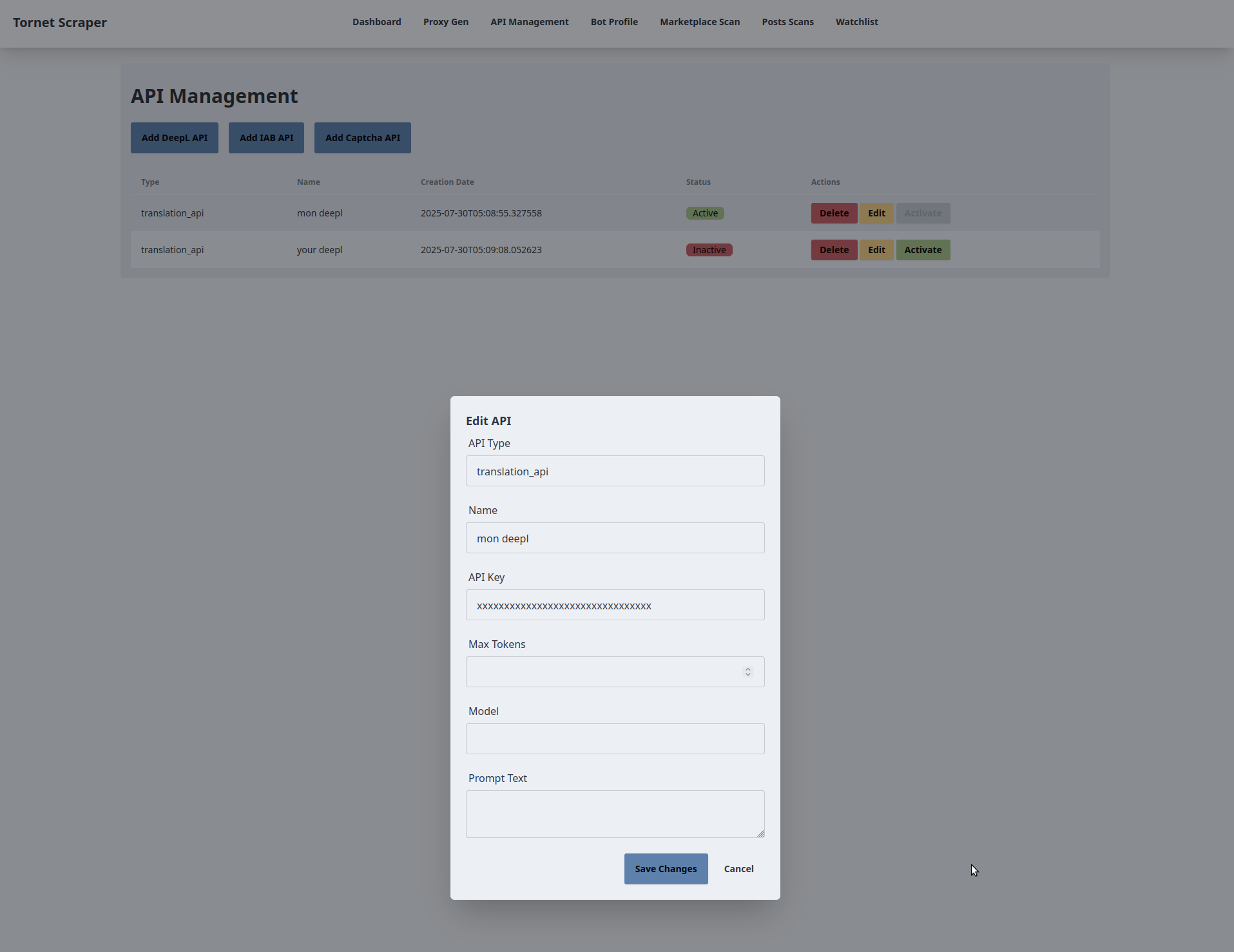
In this section, we will explore the interface for managing APIs, which requires multiple API types: one for DeepL to handle data translation, another for CAPTCHA bypassing, and one for text analysis.
The topics covered in this section include:
- Database models
- Backend for API management
- Frontend for API management
- Testing
This chapter will be straightforward, as it introduces basic CRUD operations. CRUD stands for Create, Read, Update, and Delete, fundamental operations in application development. In fact, most applications primarily rely on CRUD functionality.
Database models
Your models are inside app/database/models.py.
Here is what your table for storing APIs look like:
class APIs(Base):
    __tablename__ = "apis"
    id = Column(Integer, primary_key=True, index=True)
    api_name = Column(String, unique=True, index=True)
    api_provider = Column(String)
    api_type = Column(String)
    api_key = Column(String)
    model = Column(String)
    prompt = Column(Text)
    max_tokens = Column(Integer)
    timestamp = Column(DateTime, default=datetime.utcnow)
    is_active = Column(Boolean, default=False)
Some APIs include a parameter called temperature, but we won’t store it here. In my experience, the default temperature of 0.1 is sufficient for most queries. However, you can experiment by adding a temperature column to the database, which would require corresponding updates to both the backend and frontend.
Backend for API management
The code for managing APIs is inside app/routes/manage_api.py. Unlike some other routes, this doesn't use any services or scraper modules.
The manage_api.py script defines FastAPI routes for managing API configurations (e.g., DeepL, Anthropic, OpenAI) in the tornet_scraper application, interacting with the database to create, update, delete, list, and activate APIs. Below is a concise explanation of its key components and functionalities.
Global Variables
logger:- Purpose: Configures logging for debugging and error tracking.
- Details: Uses
loggingmodule withINFOlevel to log operations and errors.
manage_api_router:- Purpose: FastAPI router for API management endpoints.
- Details: Configured with prefix
/api/manage-apiand tags["API", "API Management"]for organization.
Pydantic Models
DeepLCreateRequest:- Purpose: Validates POST request data for creating a DeepL API.
- Fields:
api_name(str),api_key(str).
IABCreateRequest:- Purpose: Validates POST request data for creating an Anthropic (IAB) API.
- Fields:
api_name(str),api_key(str),model(str),max_tokens(int),prompt(str).
CaptchaCreateRequest:- Purpose: Validates POST request data for creating an OpenAI (Captcha) API.
- Fields:
api_name(str),api_key(str),model(str),max_tokens(int),prompt(str).
UpdateRequest:- Purpose: Validates PUT request data for updating an API.
- Fields:
api_name(str),api_key(str),model(str, optional),max_tokens(int, optional),prompt(str, optional).
Functions
-
set_active_api:- Purpose: Activates a specific API and deactivates others of the same provider.
- Key Parameters:
db: SQLAlchemySessionfor database operations.api_id: Integer ID of the API to activate.api_provider: String identifying the provider (e.g.,deepl,anthropic).
- Returns: None.
- Details: Updates the
is_activefield toFalsefor all APIs of the same provider except the specifiedapi_id, which is set toTrue. Commits changes to the database.
-
create_deepl_api:- Purpose: Creates a new DeepL API configuration.
- Key Parameters:
request:DeepLCreateRequestwith API name and key.db: SQLAlchemySession.
- Returns:
JSONResponsewith success message. - Details: Checks for duplicate
api_name, creates anAPIsmodel instance (api_provider="deepl",api_type="translation_api"), saves it to the database, and returns a success response. RaisesHTTPException(400 for duplicates, 500 for errors).
-
create_iab_api:- Purpose: Creates a new Anthropic (IAB) API configuration.
- Key Parameters:
request:IABCreateRequestwith API name, key, model, max tokens, and prompt.db: SQLAlchemySession.
- Returns:
JSONResponsewith success message. - Details: Similar to
create_deepl_api, but setsapi_provider="anthropic",api_type="iab_api". Validates and stores additional fields (model,max_tokens,prompt).
-
create_captcha_api:- Purpose: Creates a new OpenAI (Captcha) API configuration.
- Key Parameters:
request:CaptchaCreateRequestwith API name, key, model, max tokens, and prompt.db: SQLAlchemySession.
- Returns:
JSONResponsewith success message. - Details: Similar to
create_iab_api, but setsapi_provider="openai",api_type="captcha_api".
-
list_apis:- Purpose: Retrieves all API configurations.
- Key Parameters:
db: SQLAlchemySession.
- Returns: Dictionary with a list of APIs (ID, name, provider, type, key, model, max tokens, prompt, timestamp, active status).
- Details: Queries all
APIsrecords and returns them as JSON. RaisesHTTPException(500) on errors.
-
update_api:- Purpose: Updates an existing API configuration.
- Key Parameters:
api_id: Integer ID of the API to update.request:UpdateRequestwith updated fields.db: SQLAlchemySession.
- Returns:
JSONResponsewith success message. - Details: Verifies the API exists, checks for duplicate
api_name, updates fields (only non-Nonevalues formodel,max_tokens,prompt), and commits changes. RaisesHTTPException(404 if not found, 400 for duplicates, 500 for errors).
-
delete_api:- Purpose: Deletes an API configuration.
- Key Parameters:
api_id: Integer ID of the API to delete.db: SQLAlchemySession.
- Returns:
JSONResponsewith success message. - Details: Verifies the API exists, deletes it from the database, and commits. Raises
HTTPException(404 if not found, 500 for errors).
-
activate_api:- Purpose: Activates a specific API, deactivating others of the same provider.
- Key Parameters:
api_id: Integer ID of the API to activate.db: SQLAlchemySession.
- Returns:
JSONResponsewith success message. - Details: Verifies the API exists, calls
set_active_apito toggleis_active, and returns a success message. RaisesHTTPException(404 if not found, 500 for errors).
-
get_api:- Purpose: Retrieves a single API configuration by ID.
- Key Parameters:
api_id: Integer ID of the API.db: SQLAlchemySession.
- Returns: Dictionary with API details (ID, name, provider, type, key, model, max tokens, prompt, timestamp, active status).
- Details: Queries the
APIstable for the specified ID and returns its details. RaisesHTTPException(404 if not found, 500 for errors).
Frontend for API management
The frontend code is located inside app/templates/manage_api.html.
The manage_api.html template extends base.html to provide a UI for managing API configurations (DeepL, IAB/Anthropic, Captcha/OpenAI) in the tornet_scraper application. It interacts with the backend via API calls to create, update, delete, list, and activate APIs. Below is a concise explanation of its key functionalities and their interaction with the backend.
-
Template Inheritance:
- Purpose: Leverages the
base.htmllayout for consistent structure. - Backend Interaction: Inherits navbar and flash message handling from
base.html. Sets the page title to "API Management" via{% block title %}. Initial API data (apis) is passed frommain.py::manage_apiand rendered into the table using Jinja2. Flash messages from the backend (stored in the session) are displayed in the inherited container.
- Purpose: Leverages the
-
API Creation:
- Purpose: Allows users to add new API configurations for DeepL, IAB, or Captcha services.
- Backend Interaction:
- Three buttons ("Add DeepL API", "Add IAB API", "Add Captcha API") open respective modals (
addDeepLModal,addIABModal,addCaptchaModal) viaopenModal(). - Each modal contains a form with required fields (e.g.,
api_name,api_keyfor DeepL; additionalmodel,max_tokens,promptfor IAB/Captcha). - Form submission triggers
createDeepLAPI(),createIABAPI(), orcreateCaptchaAPI(), sending AJAX POST requests to/api/manage-api/create/deepl,/iab, or/captcha(handled bymanage_api.py::create_deepl_api,create_iab_api,create_captcha_api). - The backend validates the request (using Pydantic models), checks for duplicate
api_name, saves the API to theAPIstable, and returns a success message. On success, a flash message is shown, the modal closes, the form resets, and the table updates. Errors trigger an error flash message.
- Three buttons ("Add DeepL API", "Add IAB API", "Add Captcha API") open respective modals (
-
API Table Display and Updates:
- Purpose: Displays a dynamic list of APIs with real-time status.
- Backend Interaction:
- The table is initially populated with
apisfrommain.py::manage_api, showing API type, name, creation date, and active status. - The
updateTable()function runs every 10 seconds (viasetInterval) and after create/update/delete/activate actions, sending an AJAX GET request to/api/manage-api/list(handled bymanage_api.py::list_apis). - The backend queries the
APIstable and returns a JSON list of APIs (ID, name, provider, type, key, model, max tokens, prompt, timestamp, active status). The table is refreshed with this data, showing "Active" or "Inactive" badges. Errors trigger an error flash message.
- The table is initially populated with
-
API Editing:
- Purpose: Updates existing API configurations.
- Backend Interaction:
- Each table row has an "Edit" button that calls
openEditModal(apiId), sending an AJAX GET request to/api/manage-api/get/{api_id}(handled bymanage_api.py::get_api). - The backend returns the API’s details, which populate the
editAPIModalform. For DeepL APIs, onlyapi_nameandapi_keyfields are shown; for IAB/Captcha, additionalmodel,max_tokens, andpromptfields are displayed. - Form submission triggers
updateAPI(), sending an AJAX PUT request to/api/manage-api/update/{api_id}(handled bymanage_api.py::update_api) with updated fields. The backend validates and updates theAPIstable, returning a success message. On success, a flash message is shown, the modal closes, and the table updates. Errors trigger an error flash message.
- Each table row has an "Edit" button that calls
-
API Deletion:
- Purpose: Deletes an API configuration.
- Backend Interaction:
- Each table row has a "Delete" button that calls
openDeleteModal(apiId), opening thedeleteAPIModalwith the API ID stored in a hidden input. - The "Delete" button triggers
confirmDeleteAPI(), sending an AJAX DELETE request to/api/manage-api/delete/{api_id}(handled bymanage_api.py::delete_api). - The backend verifies the API exists, deletes it from the
APIstable, and returns a success message. On success, a flash message is shown, the modal closes, and the table updates. Errors trigger an error flash message.
- Each table row has a "Delete" button that calls
-
API Activation:
- Purpose: Activates a specific API, deactivating others of the same provider.
- Backend Interaction:
- Each table row has an "Activate" button (disabled if already active) that calls
activateAPI(apiId, apiType), sending an AJAX POST request to/api/manage-api/activate/{api_id}(handled bymanage_api.py::activate_api). - The backend calls
set_active_apito setis_active=Truefor the specified API andFalsefor others of the same provider, committing changes to theAPIstable. On success, a flash message is shown, and the table updates. Errors trigger an error flash message.
- Each table row has an "Activate" button (disabled if already active) that calls
While using Anthropic or OpenAI is not mandatory, I’ve streamlined the process for simplicity. In another app, I implemented support for four different providers, offering dozens of models. However, this level of flexibility is often unnecessary, as it adds complexity to the backend code.
Testing
Here is how you can add two DeepL APIs but activate only one of them at any time.